Pencil
Available
Collect feedback, understand responses, and turn insights into assigned actions.
Pencil is available as MIT-licensed source for self-hosting. See its public source and release documents for setup. Business can also install and run projects for invited accounts; the app shows whether it offers Pencil before checkout.
Run Pencil on your own computer with one line:
npx -y @runeditrun/rer dev just-every/run-pencilIt clones the public source, installs it, sets up a local owner and starts the app; nothing is deployed. To set up without starting, run npx -y @runeditrun/rer setup just-every/run-pencil. Without Node 22 or later, run curl -fsSL https://runeditrun.com/install.sh | sh -s -- dev just-every/run-pencil.
For HappyToHelp: Assisted is in early access; Managed is in early access.
- Category
- forms
- Licence
- MIT
- Version
0.7.0- Requirements
- 120 clauses
- Release signature
- Signed by just-every · key
rer-ed25519-5a42fb9c9c4f8acb2b32386e9e40461c· statement - Target release
- v0.7.0 · published
- Publisher’s stage
- first-release-profile-candidate-local-runtime
- Instead of
- Typeform, Google Forms, Jotform
Screenshots
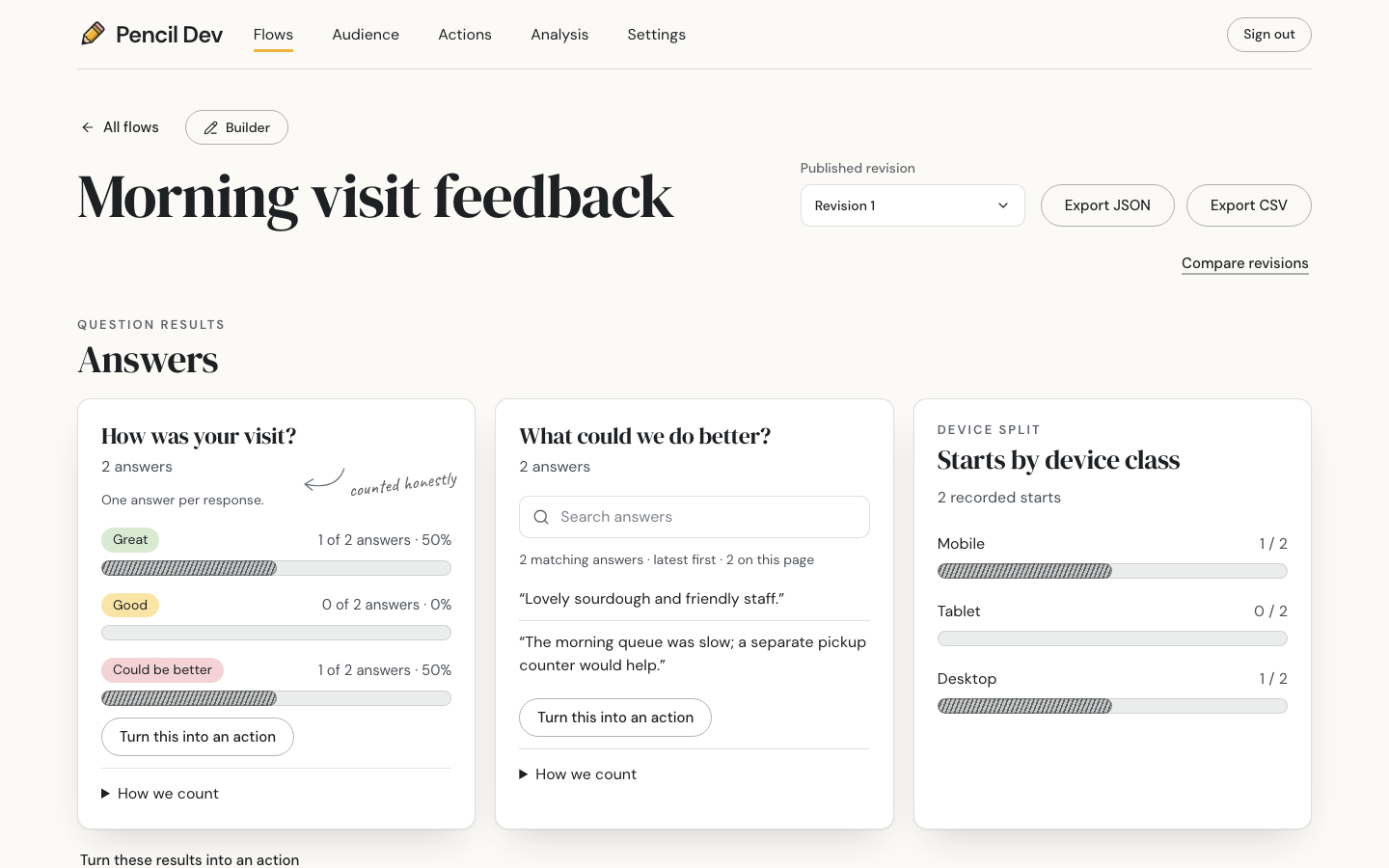
Pencil Results at 1440 pixels, running locally with sample responses. This is the screenshot committed with v0.5.0; the v0.7.0 release notes name the same file, committed unchanged at the listed v0.7.0 revision.
Outside services
The services the project declares it sends data to, each with its reason.
completion-destination- An operator-approved destination is a separate business page; the browser navigates there after a committed response, using only the explicitly mapped URL parameters.
mail- Cloudflare has no owned primitive that delivers transactional email to external recipients, and BASE-ACCESS-001 magic-link sign-in is delivered by mail, so no deployment can run without it.
ai- Evidence synthesis and draft-question assistance require a model provider; no model is bundled with the deployment.
task-destination- Creating a task in a buyer-selected task system necessarily sends the confirmed action to that system.
typeform- Fetching a form definition at the owner’s request needs Typeform’s forms.read API. The personal token is used for this request only and is never stored.
Scope and limits
One business, one shared workspace, equal operators with no roles.
What it will not do
- Multiple workspaces
- Roles and permissions
- Agency management
- Payments and order forms
- Appointment scheduling
- Public template marketplace
- Survey-panel recruitment
- Native mobile apps
- Video, audio, signature, and file-upload questions
- Single sign-on
- Advanced fraud scoring
- Broad marketing analytics
- Live collaborative editing
- Arbitrary automation builder
- Storing or reporting the answers of an abandoned session
Extension points
Optional conveniences for common changes. Owners can change any source, including core logic, schema and infrastructure.
flow.branch-selection.v1flow.audience-eligibility.v1flow.reminder-schedule.v1response.identity.v1flow.response-admission.v1analysis.autorun.v1analysis.disclosure.v1recommendation.selection.v1flow.created.v1flow.published.v1flow.closed.v1participant.invited.v1response.completed.v1analysis.completed.v1analysis.failed.v1action.created.v1action.reviewed.v1navigation.after.v1dashboard.after.v1flow.row.actions.after.v1flow.header.actions.after.v1flow.editor.sidebar.after.v1flow.step.settings.after.v1flow.results.header.after.v1flow.results.finding.after.v1response.question.after.v1settings.after.v1mail.sender.v1ai.provider.v1task.destination.v1app.routes.v1app.navigation.v1app.settings.v1jobs.consumers.v1schedules.cron.v1
Declared limits
- Calculations
- Per Revision 50
- Expression Depth 12
- Expression Nodes 128
- Text Characters 10,000
- Decimal Places 15
- Hidden Fields
- Per Revision 20
- Text Characters 1,000
- Status
- estimated
- Must Be Replaced By Load Test
- yes
- Flows
- Total 1,000
- Simultaneously Open 50
- Flow Revisions
- Per Flow 100
- Steps
- Per Revision 300
- Choice Options Per Step 250
- Priority Options Per Step 10
- Branch Rules Per Step 100
- Structure Per Revision 50
- Contacts
- Custom Fields 20
- Field Key Characters 64
- Field Value Characters 500
- Csv Bytes 2,097,152
- Csv Rows 5,000
- Participants Per Revision 25,000
- Total 100,000
- Responses
- Per Revision 100,000
- Short Text Characters Per Answer 200
- Open Text Characters Per Answer 5,000
- Respondent Sessions
- Retention Days 30
- Abuse
- Minimum Seconds From Form Load To Submit 3
- Public Rate Limits
- Requests Per Ip Per Minute 120
- Final Submissions Per Ip Per Minute 30
- Operator Rate Limits
- Requests Per Operator Per Minute 600
- P95 Milliseconds
- Public Screen 500
- Answer Transition 500
- Final Submission 1,000
- Response Ledger 500
- Notes
- These are design targets, not proven capacities. The backend pass must load-test them, revise the values, and mark status as tested before release.
- Brand
- Logo Bytes 262,144
- Logo Mime Types image/png, image/jpeg, image/webp
- Name Characters 100
- Supporting Line Characters 240
- Logic
- Conditions Per Rule 20
- Group Depth 3
- Questions
- Dropdown Choices 1,000
- Nps Minimum 0
- Nps Maximum 10
- Number Maximum Decimal Places 15
- Date Minimum 0001-01-01
- Date Maximum 9999-12-31
- Consent Statement Characters 1,000
- Per Revision 250
- Import
- Combined Bytes 8,388,608
- Responses 100,000
Requirements
All 120 clauses of Pencil’s CONTRACT.md. They say what the project must do; the handover and verification records say what is built and tested.
HOME 1 clause
HOME-001Public landing By the owner's 12 October 2026 decision,/serves Base's shared Lobby when no public landing flow is selected (Finish setup until the owner confirms first-run setup, then Sign in;GET /setup/stateanswers the same claim state), and/pencilredirects to/. An explicitly selected open published flow keeps its canonical respondent experience and admission checks at/. A later closed flow shows the standard closed page; an archived or missing flow returns 404, just as its direct link does. Business branding follows BRAND-001. The optional default-off staticPowered by Pencil · runeditrun.comcredit remains available. A selected respondent landing contains no vendor marketing, pricing, invented metrics, testimonials, or third-party requests.
SITE 2 clauses
SITE-001Product page The run site's/(run-pencil.com, written byrer build --site) renders Pencil's own product page for people evaluating the software: what Pencil does, its Run Pencil action to/run, and links to the source repository and the documentation. It sets no cookies, loads nothing from third-party origins, links no installed-instance route, and makes claims only about active clauses of this contract: no deferred ANLY, ACT or NOTIFY features, invented metrics, customers, testimonials or pricing. The installed/is governed by HOME-001.SITE-002Live answer path The product page's first screen demonstrates an answer path: choosing an answer on the illustrated card shows the follow-up question that answer leads to, works by keyboard, announces the change to assistive technology, and respects reduced motion. Without JavaScript the card shows one complete question, answer and follow-up.
DOCS 1 clause
DOCS-001Documentation/docsand/docs/<slug>render the product documentation from Markdown in this repository at build time, with navigation, an on-page table of contents and previous/next links. Unknown slugs return 404. Docs pages set no cookies and load nothing from third-party origins.
SHELL 1 clause
SHELL-001Operator shell/appand every route below it require a valid operator session before the operator document or API data is served. A valid session receives labeled, keyboard-operable navigation to the implemented operator surfaces; the public respondent experience is never an operator navigation destination./signinremains sessionless and is the only entry point to the operator session flow, so an unauthenticated request never receives the operator shell as a fallback.
OPER 3 clauses
OPER-001Equal operators Every operator can see and act on every flow, audience, response, analysis, and action. There are no roles.OPER-002Management Operators are invited and removed in settings. Any operator may invite another and may remove any other operator, except that the setup operator can be removed only by themselves and the last operator cannot be removed. There are no roles (OPER-001), so there is no seam that narrows who may do this.OPER-003Sign-in depends on mailBASE-ACCESS-001magic links are delivered throughmail.sender.v1, so mail is a required external, not an optional one: startup fails under WS-003 naming the missing variable whenMAIL_PROVIDER,MAIL_API_KEY, orMAIL_FROMis absent. No deployment starts in a state where no operator can sign in.
WS 3 clauses
WS-001Workspace time zone Settings hold one IANA time zone for the workspace. First-run setup offers the browser's IANA time zone as an editable default; existing configured workspaces retain their saved zone. Every deadline, sending window, digest send time, and operator-facing date and time is evaluated and displayed in it. A revision records the zone in force when its deadline was set, so changing the workspace zone later cannot move a deadline on an open revision.WS-002Sending hours Settings hold a daily sending window in the WS-001 zone, defaulting to 09:00–17:00 every day. Scheduled mail — reminders and digests — that falls due outside the window is held and sent when the window next opens; nothing is dropped for falling outside it. Mail an operator triggers directly, and every magic link, is sent immediately regardless of the window.WS-003Optional externals are configuration, not degradation SupersedesBASE-SECRET-002. Pencil starts only when every variable marked required inseed.json → envis present, and fails at startup naming the first missing one.ai.provider.v1andtask.destination.v1are declared optional: with either absent the deployment starts and serves, every clause that does not name that adapter holds in full, and each feature offered by the implemented profile that does name it is shown as unavailable alongside page-local connection setup, with deployment variables retained as an alternative. Features deferred by the declared contract profile are omitted from the interface until implemented. No feature silently produces a reduced result instead.
BRAND 1 clause
BRAND-001Saved business identity SupersedesBASE-INPUT-003for business logos only. Operators save the business name, one supporting line, an accent in #rrggbb format, and an optional PNG, JPEG or WebP logo withinseed.json → limits.brand. A fresh workspace asks its owner for the business name at/setupand uses neutral defaults until saved. The same saved brand appears in preview, direct and embedded forms, completion and closed states, the selected public landing, and new-response email. Email includes the saved name and supporting line as literal text and escaped HTML, the saved accent, and any validated logo as inline CID bytes with no remote resources; removing the logo affects the next dispatch run. The accent's button text has at least 4.5:1 contrast; a readable foreground is selected for other accent text. Logo removal takes effect everywhere. Authenticated server uploads check size, declared MIME and content signatures, refusing SVG. Logos are served from this installation with the validated Content-Type and nosniff, with no third-party request. This clause supersedes BASE-INPUT-003 for business logos only: their bytes live in D1 and are deliberately public inline images, included in deployment exports, rather than private R2 downloads. Business identity is independent of Pencil's operator authentication branding.
DASH 2 clauses
DASH-001First flow A fresh deployment has no sample flows or responses. A workspace with no flows shows an empty state that explains Ask → Signal → Act. The empty dashboard and New flow offer Customer feedback, NPS and Contact/lead templates alongside a blank flow. Templates create ordinary editable drafts and can be duplicated under FLOW-011. Synthetic sample data is an explicit local development option.DASH-002Flow list Operators can list flows by draft, open, closed, or archived state, sorted by last activity, with completed-response count, audience, and analysis status visible. An invited flow also shows completions divided by launched participants not bounced or opted out; zero eligible participants shows0 / 0with no percentage. An anonymous public flow shows starts and completions without inventing a target denominator.
FLOW 21 clauses
FLOW-001Lifecycle A new flow is draft; publishing makes it open; an open flow can close; a closed flow can reopen the same published revision only after no deadline or target condition remains satisfied, or it can archive; a draft can archive; and an archived flow cannot reopen. Draft public URLs return 404, closed revisions show the standard closed page, and archived public URLs return 404. Archiving removes the flow from default operator views without deleting its revisions, responses, analyses, or actions.FLOW-002Ordered steps A draft contains an ordered list of steps: at most one welcome screen, which is optional and can only be first; one or more questions; and one or more named completion screens. Operators can add, edit, duplicate, reorder, and delete them.FLOW-003Question types A question is short text, long text, email, single choice, multiple choice, rating, priority, dropdown, yes/no, NPS, number, date, or consent; it has a prompt, optional why-we-ask text, required flag, and applicable editable type-specific options within the limits inseed.json. The builder canvas uses the same respondent controls.FLOW-004Saved edits A field-valid builder write includes the draft version it read and may leave the graph incomplete until publication. One Save per step acknowledges a single version-checked transaction containing its content, choices and answer paths. Invalid writes change none of those fields. A current-version edit is persisted before the builder shows it as saved; a stale edit is rejected with the latest version and cannot overwrite another operator's edit. Leaving or reloading after the saved indicator cannot lose the accepted edit.FLOW-005Branching A single-choice or dropdown answer can match equality against a stable choice ID; yes/no and consent answers can match boolean equality; rating, priority, NPS, number and calendar-date answers can match equality or ordered comparison; and a multiple-choice answer can match any or all selected stable choice IDs. Priority equality compares the complete ordering and ordered comparisons use a choice's rank. Preview shows the ordered rule evaluations and chosen next step used by the published runtime, using the same predicates. Policy:flow.branch-selection.v1; default: first matching rule in displayed order, then the required default path.FLOW-006Publish validation Publishing runs every FLOW-012 through FLOW-014 validation and is rejected with all offending stable step IDs and reasons; rejection creates no revision and leaves the draft editable.FLOW-007Preview isolation Preview runs the current draft with test answers, identifies itself as preview, sends no invitations or external effects, and never creates a response or changes result counts.FLOW-008Published revisions Publishing creates an immutable numbered revision and makes it the current revision resolved by the flow's canonical direct and embed URL. Every invitation, first-interaction session permitted by RESP-013, completed response, analysis, and export records the revision it used; merely loading the page creates no session or visitor record. The only load-time recording is RSLT-013’s anonymous aggregate counter increment, with no identifier or cookie and no link to a response.FLOW-009Live edits Editing an open flow changes a new draft only. Existing invitations and first-interaction sessions stay pinned to their recorded revision; publishing the draft affects only later direct or embedded sessions and later invitation launches.FLOW-010Closure An operator may close a flow immediately or configure a revision-specific deadline or completed-response target. A deadline is an instant in the WS-001 zone recorded with that revision. A manual flow close closes every revision's admission; a deadline or target closes only that revision's admission atomically.FLOW-011Duplication Duplicating a flow creates an unlinked draft containing its latest draft or published structure and settings, but no audience members, invitations, responses, analyses, actions, delivery history, or external IDs.FLOW-012Valid references Every branch predicate references an existing structured question and stable choice when applicable, and every branch destination references an existing question or completion screen.FLOW-013Reachable termination The flow's first step is its welcome screen or its first question, every step is reachable from it on at least one path, and every possible path reaches one completion screen without a cycle.FLOW-014Valid questions Every question has a non-empty prompt within the text limit, every structured question has valid distinct options within its type limits, and the flow contains at least one question.FLOW-015Stable structure IDs A step and each of its choices receive stable IDs when created; editing, reordering, publishing, exporting, and importing preserve them, while duplication creates new IDs. Operators enter choice labels; answer values are generated from them, remain unchanged when a saved label is renamed, and can be edited under Advanced.FLOW-016Published policy snapshot A published revision stores the evaluated configuration forflow.branch-selection.v1,response.identity.v1, andflow.response-admission.v1; later policy changes affect only a newly published revision.FLOW-017Revision admission A new direct or embedded visit starts the current revision; an invitation starts its recorded revision; and a returning first-interaction session resumes its recorded revision. A superseded revision cannot start a new anonymous session and remains reachable only through an existing invitation or session until its admission closes.FLOW-018Revision counts Deadline and target admission checks use completed responses for that revision only. Reaching either condition cannot close another revision, while manual close and archive close all revisions.FLOW-019Answer values by type A stored answer is exactly one of: for short text and long text, a string within that type's character limit inseed.json → limits; for email, a syntactically valid address stored as the respondent typed it and compared case-insensitively; for single choice and dropdown without Other selected, one stable choice ID belonging to that question; for multiple choice without Other selected, a set of distinct stable choice IDs belonging to that question, within its configured minimum and maximum selections, except that the configured None option alone satisfies the minimum; when Other is selected on any of these types, exactly{choiceIds: string[], otherText: string}, with distinct IDs belonging to the question and including its configured Other ID, exactly one ID for single choice or dropdown, and non-blank Other text within the short-text limit and configured FIELD-013 validation. None cannot be combined with another choice or an Other-answer object, and Other text without the Other selection is invalid; for rating, an integer within the question's configured scale; for priority, a complete ordering of that question's stable choice IDs with no repetition and no omission; for yes/no, a boolean; for NPS, an integer from 0 through 10; for number, a finite number within optional minimum, maximum and decimal precision; for date, a true calendar YYYY-MM-DD value within optional earliest/latest bounds without timezone conversion; for consent,{accepted: boolean, statement: string}retaining the immutable published statement, with required consent accepting only true. For FIELD-003 score and FIELD-004 contact questions, the stored values are the typed, normalized values those clauses define. Nothing else is a valid answer.FLOW-020Required applies to the path taken A required question blocks progress only on a path that reaches it. A question that the respondent's answers route around is never asked, never recorded as unanswered or missing, and never blocks final submission; publish validation does not require a required question to appear on every path.FLOW-021Deleting a question keeps its answers Deleting a step in a draft changes only that draft. Answers already collected keep their stable step ID and the revision that asked them, stay in the ledger, results, exports, and existing analyses, and are never rewritten or removed by a later publication. A question first added in a later revision is never reported as unanswered by responses to an earlier revision that did not contain it.
LOGIC 1 clause
LOGIC-005Conditional completion and redirect A flow may choose its completion screen, or redirect to an HTTPS URL on an approved origin with declared values appended, chosen by LOGIC-006 rules over answers, hidden fields, calculations or scores. Acceptance: a browser journey takes two paths and lands on two different completion targets, one chosen by a compound AND rule over an answer and a hidden field; a redirect to an unapproved origin is refused at publish. Status: done — Conditional on-screen completion routing ships through FLOW-005. Immutable completion redirects require an explicitly approved HTTPS origin and declared query mappings. The shared conditions select a completion target from accepted on-path answers, hidden fields, calculations and native scores. Preview shows the target without navigating or collecting; only a committed submission returns a server-derived URL. Replay retains the original revision, values and destination, and copies remap parameter operands. Evidence:src/core/shared/completionRedirect.ts,tests/runtime/completion-redirects.worker.test.ts,tests/e2e/completion-redirects.spec.ts.
A11Y 1 clause
A11Y-001WCAG 2.2 AA respondent experience Every respondent page, layout, question type, error, progress indicator and completion screen meets WCAG 2.2 AA: keyboard operation, visible focus, labels and required semantics, error association, 4.5:1 text contrast with the saved brand, reflow at 320 CSS pixels, reduced motion and screen-reader announcements on step change. Today this obligation covers all 22 shipped question types and the three shipped layouts: one question per screen, classic pages and question groups. Standing rule: every question type or layout added later inherits all these obligations and must meet them before it can ship. Acceptance: browser journeys run axe and keyboard-only completion over all 22 shipped question types and all three shipped layouts at phone and desktop widths with zero violations, checking step focus and announcements, associated errors, saved-brand contrast, reduced motion and 320px reflow; each later type or layout extends this journey before it ships. Status: done — All 22 shipped question types, standalone questions, classic pages, groups, welcome, completion, closed and unavailable-resume states have native keyboard and WCAG 2.2 axe journeys at 1440 and 390, including 320px reflow, required/error associations, first-invalid focus, screen-change focus, reduced motion and saved-brand button contrast. Future question types and layouts must extend these checks before shipping. Evidence:src/core/shared/ui/AnswerFieldset.tsx,src/core/shared/ui/useRespondentFocus.ts,tests/e2e/respondent-accessibility.spec.ts.
AUD 6 clauses
AUD-001Contacts Operators can create, edit, import, and delete contacts with name, email, and custom fields. Email addresses compare case-insensitively and an import reports, rather than silently duplicating, matching contacts.AUD-002Segments A segment filters contacts by stored fields. Launching invitations records the participant set plus evaluatedflow.audience-eligibility.v1andflow.reminder-schedule.v1configuration, so later contact, segment, or policy changes do not rewrite the launch; AUD-006 still enforces current hard consent and existence checks at send time.AUD-003Participants Each invited contact becomes one participant with an opaque invitation token, independent queued/sent/bounced/failed delivery status, eligible/opted-out consent status, and not-started/started/completed response status. Delivery attempts are append-only, and names, emails, and other contact values never appear in the public URL.AUD-004Eligibility Invitations are created only for contacts allowed by the audience policy; that policy may narrow but never admit a missing-email or opted-out contact. Policy:flow.audience-eligibility.v1; default: also exclude contacts already invited to that published revision.AUD-005Launch idempotency Repeating the same audience-launch command for one revision returns the original launch and cannot create duplicate participants, invitation jobs, or delivery attempts.AUD-006Send-time eligibility Immediately before each invitation or reminder, Pencil verifies that the contact still exists and has not opted out. Mail uses the participant email snapshot displayed and recorded at launch; editing the contact later never silently reroutes an active participant.
DIST 12 clauses
DIST-001Public link Every open revision has a canonical direct link that renders the respondent experience without an operator session.DIST-002Embed One asynchronous script or HTTPS iframe embeds the same respondent experience. It does not block the host page, and direct and embedded submissions produce the same response data and validation. Script embeds use an asynchronously loaded installation-origin script that mounts a sandboxed iframe without allow-same-origin, resizes to its content and emits only loaded, height and completed events. Exact allowed host origin, exact frame source, opaque child origin, challenge and field shape are checked. No answers, response identifiers, credentials or contact details enter the host URL, DOM or messages. The plain iframe option remains available.DIST-003Invitations An operator can send an invitation to eligible participants. Each message names the business and flow, contains that participant's opaque link, and records a durable delivery attempt before callingmail.sender.v1.DIST-004Reminders Reminders are sent only to sent participants who have not completed, opted out, bounced, or reached a closed or archived flow. Completion cancels pending reminders. Policy:flow.reminder-schedule.v1; default: one reminder 2 days after the invitation, released within the WS-002 sending hours.DIST-005Opt-out Every invitation and reminder includes an opt-out link. Opting out prevents future flow mail to that contact regardless of policy. Renewed consent records its actor, time, and source before mail can resume; opt-out does not delete an existing response.DIST-006Mail retry A transientmail.sender.v1failure is retried at most 5 times over 1 hour using the original delivery idempotency key.DIST-007Adapter isolation Mail cannot be unconfigured (OPER-003). A failingmail.sender.v1disables invitations, reminders, notification mail, and new magic-link sign-ins with a named error visible to operators, while existing operator sessions, direct links, embeds, response collection, results, the ledger, and exports keep working. Recovery is restoring the sender; Pencil offers no password or bypass sign-in.DIST-008Terminal delivery A permanent mail failure or exhausted retry is marked failed with the provider reason and retry action visible to operators; no invitation is recorded as sent merely because it was queued.DIST-009Embed isolation The embed rejects a host origin not allowed by BASE-PUBLIC-002 before rendering the flow. It exposes no answer, response ID, participant token, or contact value to the host URL, DOM, orpostMessage; host communication is limited to non-identifying loaded, height, and completed events.DIST-010Ambiguous mail outcomemail.sender.v1implements send-or-get by delivery idempotency key when its provider supports lookup. An ambiguous timeout without lookup is marked unknown and is not automatically retried; an operator may reconcile or explicitly resend it with the duplicate-delivery risk shown.DIST-012QR codes and kiosk mode Every public collector, including each named collector and the default direct and embed links, has its own public URL and a downloadable QR code (SVG and PNG) carrying its source label. Invitation, imported and unknown system-source buckets are historical attribution, not public collectors: they have no public collection URL, receive no QR code, and retain their existing identity semantics; kiosk mode restarts the form after completion on a shared device, clears all answers from the browser after a configurable idle time, and never shows the previous respondent's answers. Acceptance: a browser journey checks the public URL and SVG/PNG QR downloads for each named public collector and the default direct and embed links, scans each QR to collect a response with the matching source, and verifies that invitation, imported and unknown system-source buckets offer neither a public collection URL nor a QR download and retain their identity semantics; it completes a kiosk form twice and proves the second session starts empty and the first response's source is the kiosk collector, then waits through the configured idle time and verifies that all browser answers are cleared and the previous respondent's answers are never shown. Status: done — Labeled SVG/PNG downloads encode each public or named collector link; shared-device completion unmounts all answer/session state, and configurable idle expiry clears abandoned answers. Two isolated responses, exact QR decoding and retained collector attribution are proved at 1440 and 390. Evidence:src/core/features/collectors/qr.ts,src/core/features/responses/ui/KioskFlow.tsx,tests/runtime/qr.worker.test.ts,tests/e2e/kiosk.spec.ts.DIST-019Restricted access A form can require a password, a verified email in an allowed domain or list (by one-time code, one response per verified email), or a signed link from the business's own app; the restriction is checked on the server before the first step renders and is stated in RESP-005's disclosure when it makes the response identified. Acceptance: a browser journey is refused without the password, verifies an allowed-domain email by code and completes once, and a second completion by the same email is refused. Status: done — Immutable password, allowed-domain/list email-code and app-signed Ed25519 access rules gate the server graph and session start. Codes expire, limit attempts and consume once; verified email uniqueness is atomic across revisions, identities are disclosed and retained, and signed links bind the exact revision and expiry. Native rules and all three browser paths at 1440 and 390 ship. Backups redact password verifiers and discard live access authorizations while retaining response identity. Evidence:src/core/features/restricted-access/,migrations/core/0050_restricted_access.sql,tests/runtime/restricted-access.worker.test.ts,tests/e2e/restricted-access.spec.ts,scripts/distribution-data.check.mjs.
RESP 19 clauses
RESP-001One question at a time A respondent sees one welcome or completion screen at a time. Questions use the flow's selected layout: one question per screen; classic pages (FIELD-008), with several questions per page, shared LOGIC-006 page conditions, validation of visible questions only and progress by page; or question groups (FIELD-012), with several questions under one heading on one screen, individual required flags and validation, and progress counting each grouped question. No layout exposes builder or operator controls. One-question screens, classic pages (FIELD-008) and grouped questions ship. FIELD-012 remains partial for optional group media (FIELD-005) and statement blocks (FIELD-011).RESP-002Truthful progress The page shows the respondent's current position and remaining reachable questions for the answers already given; classic layouts under FIELD-008 show the current page and remaining reachable pages instead. Branching can change that count, and skipped or unreachable questions are never counted.RESP-003Answers The respondent can submit only the values FLOW-019 defines for the published question's type and configured limits. Every question begins unanswered. False yes/no answers and zero scores or numbers count only after explicit selection or entry. Rating, priority, and choice questions begin unselected and require affirmative respondent selection. Required fields show Required and expose required semantics; a required unanswered or invalid question stays on screen with a field-specific error and creates no response. Choosing Other makes its text box required even on an otherwise optional question: empty or whitespace-only text shows the field-specific “Please specify your Other answer.” error and cannot create a response. Configured Other-text validation applies in both browser and API, and None is exclusive. In one-question and question-group layouts, progress is the share of currently reachable questions answered validly or deliberately skipped when optional; remaining includes every unfinished reachable question. Classic pages under FIELD-008 count reachable pages, validate only visible questions and do not let a hidden required question block progress. Skipping never creates an answer.RESP-004Back navigation A respondent can move back through screens already visited in the current session and edit an answer. Pencil recomputes the forward path and progress and discards answers belonging to steps that become unreachable before final validation, export, or analysis.RESP-005Privacy disclosure Before the first answer, the flow states why feedback is requested, whether the response is anonymous or identified, who can see individual answers, and each configured external and data category declared inseed.json → externalsthat may receive the answers. The policy decides which identity mode applies; it can never suppress or weaken the disclosure of the mode it chose. Policy:response.identity.v1; default:anonymous-public-link, with invited responses identified. Publishing a form in identified mode recordsidentified-public-linkon that revision; declared identifying hidden fields supplied by the public link are typed, link-supplied and unverified, and their values and forwarding implications are disclosed before answering. RESP-023 requires the identifying link to bind one revision and fix those identifying values, with a reasoned refusal on another revision; its partial status records the remaining link-binding work.RESP-006Anonymous means anonymous An anonymous response records no contact link, no participant, no name or email taken from an invitation, contact record, or session, no raw IP address, and no host-page identifier. It receives a random response ID that cannot be reversed to identify the respondent; expiring rate-limit and session state is not linked to that ID. An email or name the respondent knowingly types into a question is stored as that answer and nothing else: it creates no contact and no participant, and RESP-005's disclosure states before the flow starts that answering such a question identifies the respondent to the operator.RESP-007Final submission A completed response, all its answers, count change, and durable outbox commands for required downstream effects are committed in one transaction before any effect is dispatched.RESP-008Admission per invitation An invitation admits only the completions its recorded admission rule allows. A visit beyond that shows the existing completion state and creates no further response, and no rule can admit a completion after the flow's admission has closed (RESP-009). Policy:flow.response-admission.v1; default: one completion per invitation; anonymous direct links allow multiple independent completions.RESP-009Concurrent closure Final submission rechecks deadline, target, and manual closure in the same admission transaction. A submission that loses the final available place sees the standard closed page naming the business and flow and creates no response.RESP-010No silent partials Pencil never captures partial answers silently. Unless a respondent explicitly chooses to save a partial response under PART-002, answers from an abandoned or reloaded session are not visible to operators, included in results, exported as responses, or counted as completions. A respondent-chosen save is the explicit exception: it may retain answers only for save and resume, without counting them as a completion or including them in completed results or default response exports. Only final submission creates completed response data; PART-002 stores an explicitly requested save separately and never makes its answers available to operators, completed results, analysis or default response exports.RESP-011Completion After a successful submission the respondent sees the published completion screen and cannot edit the completed response through the public link.RESP-012Submission retry A submission idempotency key is scoped to one respondent session and published revision and retained with the completed response. Retrying that key returns the same response ID and completion screen and cannot increment counts or dispatch downstream effects twice.RESP-013Session metrics The first respondent interaction creates an expiring session record containing only an opaque session ID, revision ID, source, start time, the stable ID of the furthest step reached, a device class of mobile, tablet, or desktop, and FIELD-006’s stable choice and block presentation IDs—never answers, contact identity, raw IP, user-agent string, or host identity. It pins the revision and supplies starts, drop-off, device, and completion-time metrics; an abandoned session expires under BASE-DATA-002 after the retention period inseed.json → limits.RESP-014Submit failure A final-submit request that is not durably committed leaves the respondent off the completion screen, preserves current in-browser answers, shows a retryable error, and retries with the original submission idempotency key.RESP-015Abuse defenses Every public submission is checked by defenses the deployment owns entirely: a hidden honeypot field, a minimum elapsed time from form load to final submission taken fromseed.json → limits, a submission token bound to the RESP-013 session, and the public rate limits enforced under BASE-ACCESS-003. Elapsed time uses the signed, non-identifying load timestamp carried by the form and returned with its submission under RSLT-013; it creates no visitor identity or server-side view record. Pencil loads no third-party challenge, script, or reputation service on a public surface, so BASE-PUBLIC-001 continues to hold. A submission whose session token is missing or unrecognized is refused under RESP-014 with a visible, retryable error naming the expired session, never silently discarded. A filled honeypot or a submission under the minimum time is retained with its reason and answers under RESP-016 and RESP-017 for owner review and reversal under RESP-018. Scoring a respondent's trustworthiness beyond these checks is out of scope.RESP-016Bot submissions are excluded and retained A submission that fills the honeypot is shown the ordinary completion screen and committed under RESP-007 as an excluded, quarantined response with its honeypot reason and all its answers retained. While excluded it changes no accepted-response count, admission check, result, analysis evidence set, notification or other downstream effect; exclusion and reversal leave anonymous view and start counters unchanged. Response exports omit automatically excluded responses by default. An owner may explicitly choose to include automatically excluded responses (honeypot or minimum-time); each included response is marked with its exclusion reason. An owner can review its reason and answers and reverse a false positive under RESP-018, after which it counts as an ordinary completed response. The exclusion records an audit entry under BASE-OPS-005 naming the defense that fired, the revision, and the time, and containing no answer text or respondent identity. It creates no visitor identity or server-side view record, and is erased under the form's normal retention and DATA-002 erasure rules. Acceptance: a honeypot hit retains its reason and answers in quarantine, an owner reviews and reverses it and it then counts. A default export omits automatically excluded responses; an explicit include adds them, each marked with its exclusion reason. Status: done — Retained honeypot and minimum-time answers, review/release, default omission and explicit inclusion in filtered, cutoff-bound CSV/JSON exports are proved bytests/runtime/traffic.worker.test.tsandtests/e2e/traffic-review.spec.tsat 1440 and 390. Rows carry state and reason; inclusion changes no accepted counts or effects.migrations/core/0046_exclusion_export_consistency.sqlinvalidates snapshots on excluded-answer changes.RESP-017Suspected submissions are quarantined, not lost A submission that fails only the minimum-elapsed-time check, measured from the signed, non-identifying load timestamp under RESP-015, is committed under RESP-007 as an excluded, quarantined response with its minimum-fill-time reason and all its answers retained. While excluded it is omitted from completed-response counts, admission checks, results, analysis evidence sets and notifications. Response exports omit it by default; RESP-016 governs the explicit include option for automated exclusions. An owner can review and reverse a false positive under RESP-018, after which it counts as an ordinary completed response. Exclusion and reversal leave anonymous view and start counters unchanged and create no visitor identity or server-side view record. It is erased under the form's normal retention and DATA-002 erasure rules.RESP-018Quarantine review Operators can list quarantined responses for a revision with their answers and the defense that quarantined them, and can release or delete each one. Releasing makes the response an ordinary completed response from that moment, and every affected count, rate, and results figure is recomputed; deleting follows DATA-002. A release is allowed after the revision's admission has closed, is recorded with its operator and time, and never reopens admission or re-triggers a deadline or target check. Nothing leaves quarantine without an operator acting.RESP-019Retained flow metrics When a session completes or expires, its start, furthest-reached step ID, device class, and completion outcome are folded into per-revision counters that hold counts only, cannot be traced to a session, response, or respondent, and are retained with the revision after the session record has expired. These counters are the source of every historical starts, drop-off, and device figure; no partial answer is retained with them.
LEDG 4 clauses
LEDG-001Ledger Operators can list and open every released completed response with stable response ID, flow revision, source, participant when identified, started and submitted times, and each answer keyed by stable step ID. A quarantined response appears only in the RESP-018 review list until it is released.LEDG-002Counts Completed-response and participant counts are derived from stored participants and completed responses. Starts come only from RESP-013 session records and the RESP-019 counters they fold into; preview sessions, duplicate submissions, failed deliveries, abandoned sessions, dropped submissions, and unreleased quarantined responses never increment completed responses.LEDG-003Filters Operators can filter the ledger by revision, submission time, source, participant status, and structured answer, while preserving the same response IDs shown in exports and evidence.LEDG-004Response export Starting an export fixes its filter and evidence-cutoff time. By default, CSV and JSON contain exactly the matching released responses committed by that cutoff, including response and revision IDs, source, timestamps, stable step IDs and labels, and lossless values for every answer including open text. Quarantined and excluded responses stay out until released, and the export names how many were excluded. An owner may explicitly choose to include automatically excluded responses (honeypot or minimum-time); each included response is marked with its exclusion reason. This RESP-016 option is the only exception: included exclusions obey the same filter and cutoff and remain quarantined, without changing accepted-response counts or downstream effects. Acceptance: A default export omits automatically excluded responses; an explicit include adds them, each marked with its exclusion reason.
RSLT 6 clauses
RSLT-001Response summary Every published revision has a results view that needs noai.provider.v1: question answer summaries appear before session metrics. It shows completed responses, starts, completion rate, and average time to complete for the current filter, each beside the counts it was computed from. Imported completions remain in answer summaries and completed counts but are excluded from native starts, completion-rate numerators and duration samples, with the imported count stated separately. It is available from publication, shows zeros rather than an error before the first session, and never blocks on an analysis run.RSLT-002Drop-off by question Results show, for each step on the published revision, how many sessions reached it and how many of those reached no later step, computed from RESP-019 counters and therefore still available after the underlying sessions have expired. A step no session reached is shown as reached by zero, not omitted.RSLT-003Stated denominators Every percentage Pencil displays in results or analysis names the numerator and denominator it was computed from. A single-answer distribution divides by the responses that answered that question and its parts sum to that denominator. A multiple-choice distribution divides by the same denominator, may therefore total more than 100%, and is labeled as multiple-select. Completion rate divides native completed responses by native starts for the same revision and filter, excluding imported historical responses from both rate and duration calculations, and is never mixed with a per-question answer rate. Changing a filter changes both numerator and denominator together.RSLT-004Device split Results show the share of sessions in each RESP-013 device class, divided by the sessions counted for that revision and filter and named as RSLT-003 requires. Device class is derived at session start, is never stored on a response, and never appears in an export of responses.RSLT-005Results across revisions A results view spanning more than one revision reports each question only for the revisions that contained it, using the responses that could have answered it as the denominator. It never treats a question added later as unanswered by earlier responses, and it never merges two questions that have different stable step IDs.RSLT-012Open-text coding Operators can tag open-text answers with workspace codes by hand, accept or reject AI-suggested codes (each suggestion citing the exact excerpt), and chart, filter and crosstab by code; every code assignment records who or what made it. Acceptance: a Worker test codes 20 answers by hand and 20 by accepted suggestion, asserts code counts and filters, and proves rejected suggestions leave no code. Status: done — Workspace codes, manual per-answer assignments, accepted/rejected exact-quote analysis suggestions, actor/source provenance, chart denominators, code filters and two-code response crosstabs ship. Hidden/redacted findings remain hidden; quarantine and erasure stay excluded; code edits invalidate filtered export snapshots. Evidence:src/core/features/coding/,migrations/core/0047_open_text_coding.sql,tests/runtime/coding.worker.test.ts,tests/e2e/coding.spec.ts,scripts/analysis-data.check.mjs.
ANLY 16 clauses
ANLY-001Analysis run An operator can request analysis for any revision with completed responses. A run is queued durably and shows queued, running, completed, insufficient-evidence, or failed status. Policy:analysis.autorun.v1; default: run when a flow closes and has at least 5 completed responses.ANLY-002Fixed evidence set An analysis records the exact response IDs and revision it read, and reads only released responses. Responses submitted, or released from quarantine, after it started are excluded and make the completed analysis stale rather than changing it in place.ANLY-003Findings A run that reaches completed status ranks themes and selects one primary finding from its fixed evidence set; an insufficient-evidence run follows ANLY-013 instead.ANLY-004Exact evidence Text presented as a respondent quote is an exact excerpt of a stored answer. Generated paraphrases and summaries are labeled as analysis and never presented in quotation marks or attributed to a respondent.ANLY-005Disclosure threshold In every analysis view, a theme or filtered segment with fewer included responses than the threshold shows no raw excerpt, participant identity, unique field combination, or breakdown; exactly the threshold is permitted. Suppression changes presentation, not the raw ledger or operator export. Policy:analysis.disclosure.v1; default threshold: 5 completed responses in that theme or current filter cohort.ANLY-006Recommendations A completed analysis with sufficient evidence may propose one primary action with rationale, linked findings, confidence, expected impact, and effort; an insufficient-evidence run proposes none. Policy:recommendation.selection.v1; default: the action supported by the highest-impact finding with sufficient evidence.ANLY-007Staleness A stale analysis remains readable and labeled with its evidence cutoff. Operators can run a new analysis; prior runs remain in history except for the erasure redaction required by DATA-002.ANLY-008Provider failure Ifai.provider.v1is unconfigured or fails an analysis or builder-assistance request, the request is marked failed with the error and retry action, no suggestion, finding, or recommendation is fabricated, and flow publishing, response collection, the ledger, and exports continue to work.ANLY-009Builder assistance An operator may request a sharper, broader, or contextual rewrite of a draft question. Suggestions show their source text and are never applied or published without an operator accepting them.ANLY-010Cost Every AI call records provider, model, input and output usage, feature, analysis or draft ID, and reported cost. Operators can view totals by day and feature.ANLY-011Evidence provenance Each displayed theme count, percentage, supporting excerpt, and recommendation records the included response IDs from which it was derived; an operator can navigate from displayed evidence to those retained responses.ANLY-012Output validation Before a run completes, Pencil validates its schema, verifies that cited response IDs belong to the run's evidence set, verifies quote ranges exactly against stored answers, and recomputes counts and percentages over that evidence set; any failure marks the run failed.ANLY-013Insufficient evidence A run whose evidence or disclosure-eligible cohorts cannot support a finding completes asinsufficient-evidence, shows the evidence cutoff and reason, and emits no theme, quote, or recommendation.ANLY-014Untrusted evidence Respondent text is treated only as data: it cannot change system instructions or configuration, select tools, call adapters, create jobs, or authorize effects; schema-invalid provider output fails under ANLY-012.ANLY-015Analysis policy snapshot Each run stores the evaluatedanalysis.disclosure.v1andrecommendation.selection.v1configuration; later policy changes affect only a new run and never retroactively reveal or reinterpret historical output.ANLY-016Provider retry A transientai.provider.v1transport failure is retried at most 3 times over 10 minutes with the same request, evidence set, and policy snapshot; schema or evidence-validation failures are terminal and never retried as transport failures.
ACT 8 clauses
ACT-001Action record An operator can accept a recommendation as an action with title, rationale, owner, target metric, review date, and links to its analysis and evidence. Accepting does not itself contact an external service.ACT-002Action lifecycle A new action is planned. Legal transitions are planned → in progress or closed, in progress → ready for review or closed, ready for review → effective, ineffective, in progress, or closed, and effective or ineffective → closed; every transition records the operator, time, and optional outcome note.ACT-003External tasktask.destination.v1must implement create-or-get by Pencil's idempotency key and return the existing remote task ID for a repeated key; repeated activation or delivery of one action therefore cannot create more than one external task.ACT-004Task failure An unconfigured adapter disables external task creation with setup guidance. A failed call keeps the local action, records the attempt and error, and offers a retry that reuses the same idempotency key.ACT-005Follow-up measurement An action records a metric name, unit, desired direction, baseline value, source, and observation time. An operator can link a later flow or analysis, record the comparable observed value and time, and mark the outcome effective or ineffective. Pencil never sets or changes that verdict itself, and no extension point can; a review date that has passed is surfaced on the action, never resolved on the operator's behalf.ACT-006Confirmed task payload Before callingtask.destination.v1, Pencil shows the action fields and operator-authenticated report link that will leave the deployment and sends only those confirmed values; raw answers and excerpts are never included.ACT-007Task delivery state External task delivery records pending, confirmed, unknown, or failed status, the idempotency key, every attempt, and the remote task ID when confirmed. An unknown network outcome is retried with the same key rather than assumed failed or sent again with a new key.ACT-008Manual recommendation An operator may write a recommendation by hand and accept it as an action under ACT-001, linked to the results evidence it rests on: a flow, a published revision and optionally one question, with the RSLT counts shown at that moment kept as they were, never response identifiers, answer excerpts or cohort filters. An action written by hand has no analysis link. The analysis link of ACT-001 is required for every action accepted from an analysis; nothing else in ACT-001 to ACT-007 is relaxed.
NOTIFY 4 clauses
NOTIFY-001Analysis attention The in-app notification center records one notification for the requesting operator when an analysis completes or fails; an automatic close-time analysis records one for every unmuted operator. Duplicate queue delivery cannot create the same notification twice.NOTIFY-002New-response mail Each operator sets, per flow, whether completed responses are mailed to them immediately, grouped daily under NOTIFY-003, or not mailed. Publication starts its publisher on Immediately only when no preference exists; every other operator defaults Off. Existing unrepublished flows default Off. A message uses the saved business identity under BRAND-001, names the flow and submission time in the workspace zone, and links to the authenticated results ledger; it never carries answer text, respondent identity, or a link that grants access without signing in. A committed, released response queues one delivery per opted-in operator, with durable attempts, bounded retries and explicit unknown-outcome confirmation. Daily uses NOTIFY-003 and keeps its recipient snapshot separate from immediate mail.NOTIFY-003Digest A digest is one message per operator per flow per day, sent at the WS-002 window's opening hour in the WS-001 zone, covering the completed responses committed since the previous digest. A day with no new completed responses sends no message, and a digest that fails to send is retried under DIST-006 rather than merging into the next day's.NOTIFY-004No mail loops Every notification, digest, invitation, and reminder is sent from the configured no-reply address (RER's assigned verified sender on Managed hosting) and marked auto-generated. Pencil ingests no inbound mail, so a reply or vacation auto-responder can never create a response, participant, notification, or further outbound mail. A bounce of operator notification or digest mail is recorded against that operator's mail setting only and never marks a participant bounced; participant bounce status comes only from invitation and reminder delivery (DIST-008).
DATA 2 clauses
DATA-001Export contents The deployment export contains every operator, contact, segment, flow and revision, step and branch, participant and delivery attempt, response and answer including quarantined ones with their state, RESP-019 revision counters, analysis and evidence link, recommendation, action, notification, setting, audit entry, and referenced file as original data. Import preserves Pencil's stable graph, revision, response, evidence, recommendation, and action linkages.DATA-002Response erasure Deleting a response, or a contact that owns it, revokes and deletes active invitation tokens, removes contact links or anonymizes retained delivery facts, and removes its answers, raw excerpts, and evidence links from every analysis within 5 minutes. Affected aggregates are recomputed or marked unavailable, affected analyses are labeled redacted and stale, and only the anonymized audit tombstone required by BASE-DATA-003 remains.
IMPORT 4 clauses
IMPORT-001Reviewed definition Operators can import a documented form-definition JSON into a new editable draft with new stable IDs. Every field, screen and logic action is listed before writes with source type, imported/changed/unsupported outcome, explicit change and reason. Unsupported logic leaves affected paths incomplete; native graph validation still controls publication.IMPORT-002Reviewed CSV Operators can map every response CSV column to a supported question, timestamp or Skip. Every row error is reported. Blank answers stay unanswered; malformed values and configured capacity excess are refused before commit. Commit requires acknowledgment of every reported change or omission; canceling review creates no job, flow or response. Acknowledgment first stores owner-private, indexed preparation with bounded database transport. Continue import verifies its complete stored fingerprint before any public job, form or response is published. Interrupted preparation remains private and can be retried or canceled under current authority; erasure removes retained copies and prevents publication or resurrection.IMPORT-003Historical privacy and pinning Imported released completions retain their original timestamps and remain anonymous, with source imported and an immutable revision matching the mapped source. Hidden values and network/IP metadata are discarded before durable planning; original file bytes are not retained, and this omission is disclosed before commit. Imported data creates no session, contact, mail, outbox event or admission effect. Later draft edits cannot reinterpret historical answers.IMPORT-004Durable replay and reversal The unchanged Base D1 import kit owns reviewed commit, source identity, bounded resume and undo. Identical files create no duplicate native records; interruption resumes the exact stored safe plan. Undo removes unedited imported data while exact native snapshot guards preserve and report later edits. Completed reversal is idempotent; retained safe plan and provenance survive. Published work resumes and undoes from durable custody without the original files.
FIELD 1 clause
FIELD-006Randomized order An operator may randomize the order of a question's choices (keeping FIELD-010's Other and None of the above anchored last) or of a block of questions; the order each respondent saw is stored with the response and exported, so order effects can be analyzed. Acceptance: a Worker test collects 200 responses and asserts every permutation stored is valid, Other and None of the above are last in every one, and the presented order is in the export. Status: done — Choice permutations keep Other and None last; question blocks use classic pages or question groups with independently shuffled display order and the same canonical logic. Presentation is fixed for Back, preview and private save/resume, retained with each completed response and exported as stable IDs. The Worker journey collects 200 responses and checks every order, both export formats, invalid permutations, revision pinning and copies; builder and collection journeys run at 1440 and 390. Evidence:src/core/shared/presentationOrder.ts,migrations/core/0051_presentation_order.sql,tests/runtime/randomized-order.worker.test.ts,tests/e2e/randomized-order.spec.ts.
GOV 1 clause
GOV-003Retention schedules SupersedesBASE-DATA-002only for a form whose owner explicitly opts into a retention schedule; all other forms keep the baseline. Each form can set a retention period after which responses, partials, uploads, signatures and payment references are deleted under DATA-002 (aggregates recomputed, analyses redacted and stale), with an advance in-app notice to Admins and a legal-hold switch that pauses all automatic deletion. Until ROLE-001 supplies Admins, the installation owner manages this setting and receives its notices. Completion covers every existing response class: released and quarantined completions and private PART-002 saves. FILE-001 uploads, SIGN-001 signatures, PAY-001 payment references and PART-001 partial capture must inherit these retention and hold rules before they ship. A period is a whole number of elapsed 24-hour days from completion, or from a private save's creation; private saves also retain their original link expiry. Every scheduled deletion has at least seven days of in-app notice, including data already older than a newly enabled period. Legal hold also pauses PART-002's automatic save-data expiry, without reviving an expired resume link. Releasing hold starts a fresh seven-day notice window. Manual DATA-002 erasure remains available. Acceptance: a Worker test sets 30-day retention, advances a fake clock and asserts advance notice then deletion with DATA-002 effects; a form on legal hold keeps its released, quarantined and private saved responses past expiry, and release provides a new notice window before deletion. It also proves owner-only settings, stale-write refusal and imported-response custody erasure; desktop and phone browser journeys configure the period, inspect notice and activate/release hold. Status: done — Owner-only, version-checked per-form retention, durable seven-day notices, legal hold including private save expiry, fresh release grace and scheduled DATA-002 erasure ship. The native Worker journey proves ordinary and imported custody, quarantine, private saves, aggregates and analysis redaction; the settings journey runs at 1440 and 390. Evidence:src/core/features/retention/,migrations/core/0052_retention.sql,tests/runtime/retention-schedule.worker.test.ts,tests/e2e/retention.spec.ts.
Baseline
Selected ownership clauses from the 22 in the project’s BASELINE.md. They are declared requirements; evidence is recorded separately.
BASE-DATA-005Independence. The deployment makes no request to the marketplace or the seed author. There is no telemetry, phone-home, licence check, or kill switch.BASE-DATA-001Export and import.rer export --output PATHproduces every record and attachment;rer import --input PATH --yesrestores it into an empty deployment; export, import, export yields an archive with equivalent contents.BASE-DATA-004Outbound flows. User data leaves the deployment only through externals declared inseed.json → externals. No other outbound request carries user data.BASE-PUBLIC-001Privacy. Public surfaces (widgets, booking pages, forms, status pages) set no cookies, load nothing from third-party domains, and send no visitor data before the visitor's first interaction.BASE-SECRET-001No leakage. No secret appears in the client bundle, in logs, or in an error response.
View as agent
These publisher documents are copied unmodified from the release. Site presentation summaries and historical screenshots are attributed separately on this page. An agent evaluating Pencil can read them instead of the page.
seed.json- The manifest: capabilities, outside services, extension points, limits, operating cost and deployment needs.
CONTRACT.md- The requirements on this page, in source form.
AGENTS.md- Instructions for the coding agent that maintains an installation.
README.md- Source setup, available commands and implementation status.
BASELINE.md- The baseline requirements the project declares.
OPERATIONS.md- How the project is set up, operated and deployed.
ACCEPTANCE.md- What the publisher accepts as a finished release.
Every project, with its availability, is in /agents/catalogue.json; the agents page describes the machine-readable files.