Slate
Available
One home for everything your team knows: pages, databases and search.
Slate is available as MIT-licensed source for self-hosting. See its public source and release documents for setup. Business can also install and run projects for invited accounts; the app shows whether it offers Slate before checkout.
Run Slate on your own computer with one line:
npx -y @runeditrun/rer dev just-every/run-slateIt clones the public source, installs it, sets up a local owner and starts the app; nothing is deployed. To set up without starting, run npx -y @runeditrun/rer setup just-every/run-slate. Without Node 22 or later, run curl -fsSL https://runeditrun.com/install.sh | sh -s -- dev just-every/run-slate.
For HappyToHelp: Assisted is in early access; Managed is in early access.
- Category
- knowledge
- Licence
- MIT
- Version
0.4.0- Requirements
- 221 clauses
- Release signature
- Signed by just-every · key
rer-ed25519-5a42fb9c9c4f8acb2b32386e9e40461c· statement - Target release
- v0.4.0 · published
- Publisher’s stage
- Core-wiki first-release candidate. Advanced flagship systems remain outside the first public release acceptance.
- Instead of
- Notion, Confluence, Guru
Screenshots
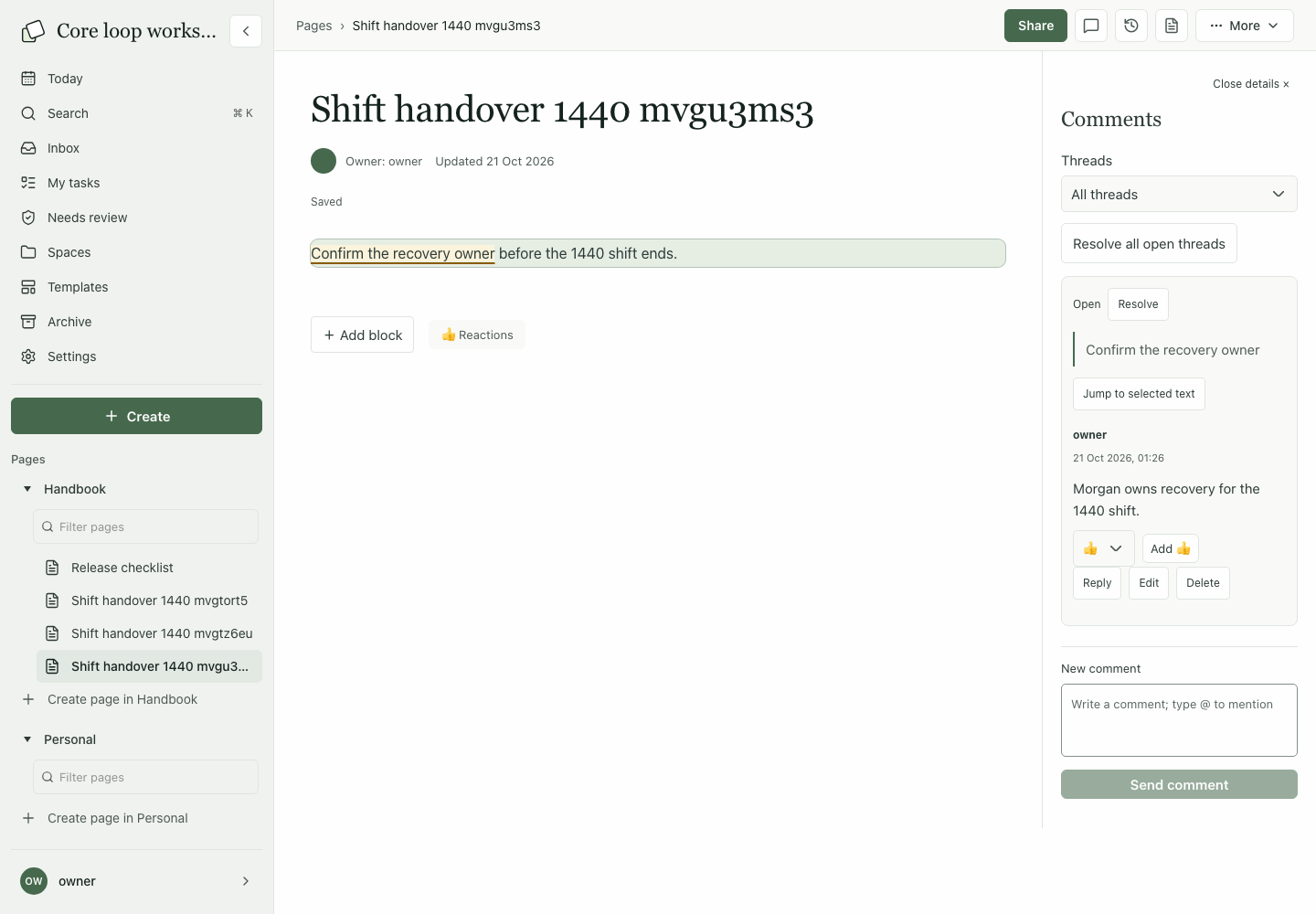
Slate v0.4.0 page workspace at 1440 pixels, from the product screenshot named in RELEASE.json.
Outside services
The services the project declares it sends data to, each with its reason.
cloudflare-platform- The supported deployment target supplies Worker compute, D1 records and search, R2 files and media, and Queues for import, export and automation jobs.
resend-transactional-email- Resend sends magic-link sign-in, member invitations and guest invitations through the mail.sender.v1 adapter; Cloudflare's owned primitives do not send hosted email.
ai-inference-provider- Selection editing, summaries, workspace answers and agents require model inference, which no owned primitive provides.
identity-provider- Sign-in through the buyer's own identity provider cannot be served by the deployment's native session auth, which remains the default.
pasted-url-origin- A link card shows the target's own title, description and icon, which only the target origin can supply; no owned primitive can know them.
chat-notification-destination- Delivering a notification into the buyer's chat tool requires that tool's own API; nothing owned can post into it.
connected-source-providers- Configured provider APIs perform identity, current authorization, evidence reads and explicitly granted effects. Native HappyToHelp and Orbit use owner-configured exact origins and expiring delegated accounts. Local adapter checks do not establish live provider acceptance.
link-preview-dns- Cloudflare DNS-over-HTTPS resolves the pasted hostname before public-address validation and each redirect.
sendgrid-transactional-email- Slate's SendGrid adapter sends sign-in and invitation links; uncertain acceptance is held for provider review without automatic resubmission.
provider-iframe-embeds- The provider serves its interactive document or video in its own sandboxed frame after the reader explicitly requests it. Slate cannot serve the provider application itself.
Scope and limits
One business, one workspace; complete inherited knowledge workspace plus all six journeys, full flagship and sustained inquiry. Requirements are not acceptance evidence.
What it will not do
- Plan ladders, subscription trials, credits, seat counting, and in-product upgrade paths: one product with every feature on has nothing to gate.
- A vendor product shelf, app switcher, or cross-product chrome from a suite this product is not part of.
- A commercial marketplace or storefront of templates, apps, agents, or services; the extension surface ships and the shop does not.
- Deep coupling to one issue tracker: an issue URL is a link card like any other.
- A bundled screen recorder: a recording is a media block.
- More than one workspace or tenant per deployment.
- A native mobile application: the operator app is one responsive web application, and it edits rather than reads on touch.
Extension points
Optional conveniences for common changes. Owners can change any source, including core logic, schema and infrastructure.
page.block-type.v1database.field-type.v1tree.node-type.v1container.section.v1workspace.additional-page.v1settings.additional-section.v1workspace.scheduled-job.v1page.lifecycle.v1page.access.v1page.public-access.v1page.version.v1page.status.v1record.page-parity.v1automation.scope.v1container.access.v1page.created.v1page.published.v1page.updated.v1page.moved.v1page.archived.v1page.access-changed.v1comment.created.v1comment.resolved.v1record.changed.v1container.created.v1member.invited.v1import.completed.v1ai.run-reviewed.v1workspace.navigation.after.v1home.after.v1page.header.actions.v1page.byline.after.v1page.detail.panel.after.v1tree.node.actions.v1discussions.panel.after.v1container.index.filters.after.v1record.row.actions.v1search.filters.after.v1settings.sections.after.v1mail.sender.v1ai.provider.v1identity.provider.v1chat.notifier.v1link.preview.v1
Declared limits
- Near Duplicate Similarity
- 0.8
- Status
- capacity values remain estimates; local Worker/D1 search now has measurements at 10,000, 50,000 and 100,000 mixed searchable rows for first-page latency, edit freshness and rebuild; hosted capacity and other limits remain unverified
- Capacity Estimate
- Members Per Deployment 250
- Guests Per Deployment 250
- Containers Per Workspace 200
- Pages Per Workspace 100,000
- Pages Per Container 20,000
- Tree Depth 20
- Blocks Per Page 5,000
- Revisions Per Page 1,000
- Comments Per Page 1,000
- Databases Per Workspace 2,000
- Records Per Database 50,000
- Fields Per Database 100
- Views Per Database 25
- Automation Rules Per Workspace 200
- Automation Chain Depth 5
- Activity Entries Per Deployment 5,000,000
- Attachment Storage Bytes Per Deployment
- 8,589,934,592
- Upload Bytes Per File
- 104,857,600
- Upload Types
- application/pdf, text/plain, text/markdown, text/csv, text/html, application/vnd.openxmlformats-officedocument.wordprocessingml.document, application/epub+zip, application/zip, image/png, image/jpeg, image/webp, image/gif, image/svg+xml, video/mp4, audio/mpeg
- Export Archive Bytes
- 17,179,869,184
- Import Archive Bytes
- 5,368,709,120
- Maximum Url Fetch Redirects
- 3
- Maximum Url Fetch Bytes
- 524,288
- Maximum Url Fetch Seconds
- 5
- Allowed Fetch Media Types
- text/html, application/xhtml+xml
- Concurrent Ai Runs
- 5
- Operator Api Requests Per Minute
- 600
- Public Requests Per Ip Per Minute
- 120
- Group Mention Size
- 50
- Table Columns
- 50
- Table Rows
- 500
Requirements
All 221 clauses of Slate’s CONTRACT.md. They say what the project must do; the handover and verification records say what is built and tested.
HOME 1 clause
HOME-001Public landing An installed Slate answers its public root path (/) with the shared Lobby (BaselobbyResponse): Slate's card mark and name, one line naming the owner's deployment, and one action, Finish setup (to/setup) until the owner has finished first-run setup (WORK-013) and Sign in (to/signin) after, over Slate's floor art; Base'sGET /setup/stateanswers exactly{"state":"unclaimed"}or{"state":"claimed"}from the same reading. The Lobby and/setup/statereveal only that state: they read no other workspace record, member identity or session, set no cookie, run no script, load only same-origin files, answer another origin or Host with the ordinary404, are rendered per request and sendno-store. The product's static landing page is the run site's homepage (run-slate.com/), written byrer build --sitefrom the edition's own source and configuration with no installation data. Its header and footer carry the configured owner name beside Slate's card logo, the same card mark the sign-in page and the app show beside the owner's name and the deployment serves from its own origin as its favicon (an SVG with PNG fallbacks and an apple-touch icon), the name being the page's only top-level heading, and the footer shows the owner's one-line description. The body is a fixed, owner-editable description of the product in one illustrated style: a hero that says what Slate is, then a section each for open source under the MIT license, pages, databases, search that respects who is asking, sharing and publishing, revision history, the other core-wiki capabilities (comments, templates, verification, inbox, containers, backup and restore) and moving in from another wiki, and a closing call to action. "Run Slate" in the hero and in the closing call to action opens the run site's Run page at/run(install rer, then clone the public source and start it withrer dev); a Docs link in its header and footer and a "Read the guide" link open/docs, and "Read the setup guide" opens/docs/install(the run site carries the same first-party pages asDOCS-001); and it links to the source repository. The landing links only to those targets, the source repository and, while the credit toggle is on, the credit, and never to an instance-only route (sign-in, setup, the app or its API). It describes only capabilities the defaultcore-wikiprofile ships. It may show a static “Powered by Slate · runeditrun.com” link when the buyer-configured credit toggle is on, which is its default. The landing exposes no workspace records or member identity and shows no metrics, testimonials, customer logos, plans or prices (it may say only that there is no per-seat pricing). It sets no cookies and runs no analytics or tracking; every font, style and image is served from the run site's own origin and every illustration, with the sample names and pages in its drawings, is drawn inline, so it loads no third-party resource. It stays readable without scripts and with reduced motion, and keeps its own fixed light palette in a dark-themed browser. Pages published to the anonymous web are served under the published-page prefix and are governed byWEB-001toWEB-007; the root never lists them.
DOCS 1 clause
DOCS-001Public documentation The public paths/docsand/docs/<slug>serve Slate's first-party documentation: the Markdown files thatdocs/site.jsonlists as published, in the sections and order it gives, which is the only navigation. The documentation Markdown is rendered to HTML at build time: a Vite plugin renders each page to static HTML when Vite loads it, in a build and in development, and never in the Worker or the browser: the emitted Worker and client bundles contain no Markdown or syntax-highlighting code, and each page is its own lazily loaded chunk that the Worker renders per request inside the landing's own header, footer, paper, ink and typeface. A page has its title as its one top-level heading (the landing's brand heading is not repeated), a section menu, an on-this-page list, previous and next links, tables in labeled scrollable regions and an Edit-on-GitHub link. Every Markdown file at the repository root, underdocs/and as a top-level<directory>/README.mdis either published or listed in the manifest as GitHub-only with a reason, and an unlisted file, a broken link or anchor, raw HTML, an image outsidedocs/media/or an absolute build-machine path fails verification or the build. Published pages describe only the defaultcore-wikiprofile, contain no maintainer-only material, and never advertise a flagship-only surface. The documentation reads no workspace record, member identity or session, sets no cookie, runs no analytics or tracking and loads only same-origin resources. An unknown, miscased or nested slug answers the branded404, a misconfigured deployment answers/docswith the same503as the landing, and/docsshares the landing's public-document rate limit.
WORK 12 clauses
WORK-001One workspace A deployment holds exactly one workspace and every container, page, record and comment belongs to it. Its name and mark are editable in settings and shown in the app header. No interface or endpoint creates a second workspace.WORK-003Member management Members are invited by email address and removed in settings. A workspace owner may invite any person and remove any member other than the setup member; a member may invite and may remove no one. The member created at setup can be removed only by themselves, andWORK-007rejects removing the last workspace owner. No policy value, extension, automation or AI action changes any of this.WORK-006Invitations An invitation is single-use, can be revoked before it is used, and can no longer be accepted 7 days after it was sent; an expired invitation is retained, not deleted. Requesting an invitation returns the same response whether or not the address already belongs to a member.WORK-007Removal Removing a member revokes their sessions and unused invitations immediately, removes their personal grants from every page and container, archives their personal container and its pages (CONT-005) rather than exposing or deleting them, leaves each page they owned with no owner and offers reassignment in bulk (CONT-006), and keeps their name on existing activity until personal-data erasure anonymizes it (BASE-DATA-003). Removing the only remaining workspace owner is rejected.WORK-008Roles A member is a workspace owner or a member. Workspace owners administer the workspace: settings, members, groups, guests, containers they are not in, and the site-wide switches inCONT-007. Every other permission comes from a grant on a page or a container (SHARE-001,CONT-009), never from the role.WORK-009Groups A workspace owner can create a named group, add and remove members, and use it as a grant principal anywhere a person can be used. Changing a group's membership changes access at once and writes one activity entry, and deleting a group removes its grants without touching the grants of its members.WORK-010Guests A guest is a person invited to named pages or containers only. A guest is outside the member count and the member list, reaches nothing but what they were granted, and cannot see the container index, the workspace member list, or search results beyond their grants. A container may forbid guests (CONT-007).WORK-011Workspace settings Settings are a shell with its own navigation, holding workspace identity, members, groups, guests, the status vocabulary, published-page and guest switches, connected services, AI, import and export. It is separate from a container's own settings shell (CONT-004), and a change in one never silently changes the other.WORK-012Theme Light, dark and follow-the-system are offered, apply to every operator surface including editors, and persist per member across sessions and devices. The anonymous read view uses the published page's own theme (WEB-002), never the reader's member setting.WORK-013First run An owner claimed through RER’s verified bootstrap or signed claim receives the configured deployment name, a General space and a Welcome page atomically, with first run complete; the name, space and page remain editable. RER currently does not convey its independently renamed app name. A local deployment runs a short wizard that names the workspace, creates the first container and its first page, and ends on an invitation step that can be skipped. It runs once, is never shown to a member who joins later, and creates nothing beyond those three records. Its native owner wizard lives at/setup: unfinished owners are redirected there from operator app routes after sign-in; completed setup and later members proceed to/app. The same native session and owner authorization guard the route and completion API.WORK-014Shortcut reference One reference lists every keyboard shortcut and every typed formatting shortcut the editor accepts, is reachable from anywhere in the operator app by a single shortcut, and matches what the editor actually does.WORK-015Identity provider Sign-in is by the baseline's magic link (BASE-ACCESS-001) and, when a workspace owner configures one, by an identity provider throughidentity.provider.v1. A provider sign-in creates no member who was not invited or allow-listed, and an unconfigured or failing provider leaves magic-link sign-in working and says which is unavailable. There is no password, no security question and no account-recovery path, becauseBASE-ACCESS-001stores no password: access to the mailbox is the credential, and the identity provider is the only alternative to it. A member who has lost their mailbox is re-invited at a new address (WORK-003), which is not a recovery flow and does not restore their old sessions. Target (16 October 2026): SAML single sign-on and SCIM provisioning areADMIN-001andADMIN-002.
SAVE 6 clauses
SAVE-001Durable save state An editor shows Saving until the write and its activity entry are committed, then shows Saved within 2 seconds of the commit.SAVE-002Failed writes A failed write leaves the editor in a failed state, never Saved. It keeps the unsent value, names the failure, and offers an explicit retry.SAVE-003Revision conflicts Every edit is submitted with the revision it began from: the block's revision for a body edit, the page's for a title, property, structure or order change. An edit against a superseded revision is rejected with 409, keeps the local draft, and offers compare, reload, or explicit overwrite. Slate never resolves a conflict by last write wins.SAVE-004Network loss While the server is unreachable the editor shows Offline and keeps the unsent draft in browser storage as recovery only. A recovered draft is labeled unsaved and never appears in the tree, in lists, in search, or in export as workspace data.SAVE-005Operation keys Every mutation accepts an operation key. Repeating a key with the same body within 24 hours returns the first response and creates no second record, notification, AI run, publish, import, or activity entry; repeating it with a different body is rejected with 409.SAVE-006Concurrent editing and optional co-editing Different blocks can be edited concurrently; revision conflicts retain SAVE-003 and unsent text. Committed blocks refresh within ten seconds without replacing a reader’s unsaved block. A page shows who has it open. Deployments may enable real live co-editing, shared cursors and presence with durable accepted operations, current ACL checks, revocation, reconnect recovery and attributable revision history. Co-editing never silently loses an accepted edit or converts unconfirmed local text into Saved. The full flagship acceptance exercises real co-editing; a deployment may keep it disabled. Target (16 October 2026): live co-editing becomes the default behavior, specified byCOLLAB-001toCOLLAB-005.
PAGE 14 clauses
PAGE-001What a page is A page has an identifier, a title, an optional icon, an optional cover, an owner, contributors, created and updated times, a container, a position in that container's tree, a body (BLOCK-001), a lifecycle state (LIFE-001), grants (SHARE-001), a revision (REV-001) and a set of labels. A label is a short text tag, unique on the page, added and removed by anyone with edit access, shown in the page's details (PAGE-007), carried through import (IMP-003) and through export and re-import (PORT-001,PORT-002,PORT-007), and never discarded; filtering and searching by label is target clauseSEARCH-010. A database record is a page (DB-010), and every comment thread, revision, decision record and public exposure record names exactly one page.PAGE-002Creation A member with edit access on the destination can create a page blank or from a template (TMPL-003), from the tree, from the global create action, or as a child of an open page. It is created in exactly one container at one position, and its initial lifecycle state followsLIFE-006.PAGE-003Identity survives everything A page keeps its identifier for its lifetime. Renaming it, editing it, moving it within or between containers, archiving, trashing, restoring, publishing and unpublishing never change it, and every link, mention, citation, content query and search result continues to resolve to it (LINK-001).PAGE-004Move A member with edit access on both places can move a page to another position, another parent, or another container, choosing the destination from a searchable picker. Children move with it, grants are re-resolved against the new parent and the change is shown before it is applied, and comments, versions and links are unchanged.PAGE-005Duplicate Duplicating a page copies its title, icon, cover, body and properties into a new page with a new identifier, optionally including its children. It copies no comment, version, watcher, analytics figure, grant beyond the destination's inheritance, or public link.PAGE-006Icon and cover A page takes an icon from emoji, a supplied icon set or an upload, and a cover from a gallery, an upload or a link. Both are removable, both render in the tree and in search results where the surface has room, and neither is required.PAGE-007Details A page's details show its owner, creator, contributors, created and updated times, length, status (STAT-002), labels (PAGE-001), views (PAGE-013) and the pages that link to it. A member withfullaccess can reassign the owner, which changes no grant and writes one activity entry.PAGE-008Favorite A member can favorite a page or a container and unfavorite it. Favorites are personal, are listed in the navigation (NAV-003), and are visible to no other member.PAGE-009Watch A member can watch a page, and watches it implicitly after commenting on it until they stop. A watched page delivers its comments, replies and published changes to that member's inbox (NOTIF-001). Watching is personal and a member's own action never notifies them. Target (16 October 2026):PAGE-016also watches a page its creator or editor creates or edits, andCONT-012watches a whole container.PAGE-010Outline A page shows an outline built from its headings that reflects the current body within 2 seconds of an edit, and selecting an entry scrolls to that heading. A page with no headings shows no outline rather than an empty one.PAGE-011Present Present mode fills the screen, paginates the page by its top-level headings, and shows no navigation, comments or editing affordances. Leaving it returns to the same scroll position.PAGE-012Page display options Each page carries its own typeface from a fixed set, small-text and full-width toggles, and these are stored on the page and are the same for every reader. They change no stored content and survive export and import.PAGE-013Analytics A page records total views and unique viewers over time with the members who viewed and edited it, and a container rolls the same figures up over its pages. Both scopes ship and neither is gated by a plan, a role beyond read access to the page, or a policy. A member's own views of their own page are counted and labeled as such, and analytics never expose a viewer a member could not otherwise see.PAGE-014Reactions A member can add and remove an emoji reaction on a page and on a comment (COMM-005). Reactions show who reacted, are not notifications, and are not counted in analytics.
TREE 5 clauses
TREE-001A nested tree in a container Every container holds one tree of pages of unlimited depth. A node shows its icon, title and whether it has children, expands and collapses, and remembers its expansion per member. A page has exactly one parent — a page or the container root — and appears in exactly one place.TREE-002Reordering and nesting A member with edit access can reorder a page among its siblings and re-parent it by dragging or throughPAGE-004. Order is explicit and stored, is the same for every member, and never changes as a side effect of an edit, a rename or a publish.TREE-003Shared with me A member's navigation lists pages granted to them individually that sit in containers they are not a member of, with their container named. Removing the grant removes the entry within the same load.TREE-004Filter the tree Each container's tree carries a filter over page titles that narrows the visible nodes while keeping their ancestors, matches within 200ms of typing, and clears in one action without changing expansion state.TREE-005Create in place A page can be created at the foot of a tree, as a child from any node's own actions, and from one global create action available on every operator screen. Each names the destination before creating.
BLOCK 10 clauses
BLOCK-001A body of blocks A page body is an ordered tree of typed blocks, each with an identifier, a type, content, and optional children. Every block has a drag handle, can be reordered and nested, can be selected with its neighbors, and can be duplicated or deleted. Block identifiers survive editing, moving and export, and an anchored comment (COMM-001) points at one.BLOCK-002Inline text Text in a block carries bold, italic, underline, strikethrough, inline code, color, links, and mentions, and nothing else. It is stored in one format, rendered underBASE-INPUT-002, and round-trips unchanged through page export, workspace export and import.BLOCK-003The insert menu Typing/at the cursor opens an insert menu grouped by kind, filtered by what is typed, navigable and selectable by keyboard alone, and it inserts at the cursor without leaving the editor. Every block type this contract names is reachable from it, and on a touch client the same list is reachable from a labeled control above the keyboard.BLOCK-004Markdown shortcuts Typed Markdown converts as it is written — headings, lists, quotes, code fences, dividers, bold, italic and inline code — and each conversion is undone by one undo without losing the typed characters. The reference inWORK-014lists every shortcut the editor accepts.BLOCK-005Mentions Typing@offers people, pages and dates in one list. A person mention notifies them (NOTIF-001) and renders their name; a page mention renders the page's current title and follows renames and moves (LINK-003); a date mention renders in the reader's locale. Target (16 October 2026):BLOCK-020adds group mentions.BLOCK-006Structured blocks The body carries headings, bulleted, numbered and toggle lists, quotes, dividers, callout panels, expandable sections, tables with header rows, and code blocks with a language and copy action. Each survives export and import and each has a Markdown or import equivalent named inIMP-002andIMP-003. Target (16 October 2026): a table-of-contents block (BLOCK-017), status labels (BLOCK-018) and diagrams.net diagrams (BLOCK-019) join them, andIMP-010names the Confluence macro each one replaces.BLOCK-007Task items A checkable item in the body toggles for anyone with edit access, records who completed it and when, and is counted where the page shows a completion figure. It is a block, not a record in a database, and it never appears in a database view. Target (16 October 2026):BLOCK-015adds an assignee and a due date,NAV-007a My tasks view andBLOCK-016task reports; a task item stays a block and still never appears in a database view.BLOCK-008Media blocks Images, video, audio and file attachments are inserted by upload, by link, or from a configured stock source, each with an optional caption and an alt text field, and stored underBASE-INPUT-003. This clause supersedesBASE-INPUT-003on disposition alone. A file requested for display — an image, video or audio block, a page icon or cover (PAGE-006), or either of those behind a published page (WEB-003) — is served inline with its declared content type; every other request for a stored file, including every file attachment and every direct request for a media file, is served with a download disposition. Both dispositions send the declared content type andX-Content-Type-Options: nosniff, and an SVG is sanitized underBASE-INPUT-002before it is served inline. Disposition changes nothing about access: a media file is readable only by a session that may read its page, or through that page's public link (WEB-003).BLOCK-009Link cards A pasted URL becomes a link card showing the target's title, description and icon, and can be switched between a plain link, an inline card and a block card without retyping it. Fetching a preview goes throughlink.preview.v1and issues a bodyless GET to public HTTPS origins only, sends no session, credential or member identity, rejects local, private, link-local and cloud-metadata addresses before the first request and before each redirect, and enforces the redirect, byte, time and media-type limits inseed.json → limits. A refused or failed fetch leaves the plain link and says so; the URL is stored exactly as pasted either way.BLOCK-010Content queries A body can hold a live list of pages defined by container, ancestor, type, status, contributor and date, ordered and limited by the author. It re-runs when the page is opened, shows when it last ran, shows each reader only the pages that reader may read, and never renders a draft (LIFE-002). A query whose source is deleted shows that, not an empty list.
LIFE 7 clauses
LIFE-001Lifecycle states A page isdraft,scheduled,live,live-with-unpublished-changesorarchived. It always has a working revision and has a published revision in every state butdraft;live-with-unpublished-changesmeans both exist and differ. Every transition records the actor and the time, and every state exists in the stored model whichever valueLIFE-006carries.LIFE-002A draft is private While a page isdraftit is absent from search, from content queries, from the inbox, from analytics, from AI grounding, from every administrative and export listing, and from the tree of every member it has not been shared with. Its body is readable only by its author and by the principals in its own grant list: sharing a draft, by link or by address, creates a grant underSHARE-001andSHARE-006, that grant requires a session like every other, it is shown in the draft's grant list, and revoking it ends access underSHARE-007. There is no readable address for a draft that carries no grant, a draft has no general access grant under either value ofSHARE-005(SHARE-004), and a draft cannot be published to the anonymous web (WEB-001). No role, policy value, container setting, workspace owner action, automation or extension defeats this.LIFE-006decides whether a draft state arises, never whether this clause holds.LIFE-003Publish Publishing takes a location, a general access setting (SHARE-004), an optional version comment, an optional schedule and an optional publish-as attribution, shows a preview of what readers will see, and on confirmation makes the page visible in its container's tree, in search and in content queries, and writes one version with originpublish(REV-002).LIFE-004Scheduled publish A publish set for a future time leaves the pagescheduled, shows that time wherever the page appears to its author, and publishes at that time without a further action. Canceling before it fires returns the page todraftand publishes nothing; a schedule that fails to fire leaves the pagescheduledand reports the failure underBASE-OPS-004.LIFE-005Unpublished changes Editing alivepage changes what readers see only when it is republished: every reader other than the editors sees the published revision, and the page shows that it has unpublished changes to anyone who may edit it. Discarding them restores the published revision as the working revision and deletes no version.LIFE-006Lifecycle profile Policy:page.lifecycle.v1; default:always-live, following Notion. Underalways-livea new page is live from creation and the product hides the publish action and its modal, close and discard draft, the draft banner, the draft chip in the tree, the scheduled state, the unpublished-changes state, the version-comment field and the publish-as selector; the page's own share panel (SHARE-001) is how it becomes visible to others. Underdraft-then-publisha new page appears only in its author's tree with a draft chip, nothing is hidden, andLIFE-003toLIFE-005are the working path. Both values store every state inLIFE-001, so a workspace can be switched either way without a migration and an imported draft is never published on arrival.LIFE-007Discarding a draft The author of adraftpage can discard it, which moves it to trash (ARCH-005) rather than deleting it, and can close it, which leaves it a draft. Neither action notifies anyone or leaves a trace in another member's tree.
SHARE 8 clauses
SHARE-001Grants A page carries an ordered list of grants. Each grant names a principal — a person, a group, a container or the workspace — a level fromfull,edit,commentandview, and an optional expiry. The panel that edits them shows every effective grant, whether it is inherited or set here, and where an inherited one comes from.SHARE-002What the levels meanfullmay read, edit, comment, share and change access;editmay read, edit and comment;commentmay read and comment;viewmay read only. Every server operation checks the level for the acting member (BASE-ACCESS-004), and no interface offers an action the level does not carry.SHARE-003Inheritance A page inherits its parent's grants, and a child added later inherits the parent's grants at that moment. A page may add grants or be restricted, and a restriction is shown on the page and on every descendant it affects. Removing a restriction restores inheritance rather than copying the parent's grants.SHARE-004General access At most one grant on a page has the container or the workspace as its principal; that is the general access grant. A page that carries none is restricted to its named grants, and a page in a personal container (CONT-005) carries none under either value ofSHARE-005. Changing it is one action and is recorded in activity.SHARE-005Access profile Policy:page.access.v1; default:workspace-generalwith all four levels, following Notion.workspace-generalmakes the workspace the general principal and shows the four-level ladder on each grant.container-generalmakes the container the general principal, labels that row with the container's name, and hides nothing else. Removing a level from the list hides it everywhere, including the comment affordance whencommentis removed. A page imported with a container-wide general grant is created with a container principal under either value, never widened to the workspace. Switching the value relabels the general access row and rewrites no grant: no value widens an existing page's general principal, and no page gains a general grant it did not already carry.SHARE-006Sharing with a person who is not a member Granting access to an address that belongs to no member creates a guest invitation (WORK-010,MAIL-001) and the grant takes effect when it is accepted. Until then the page shows the pending grant, and revoking it cancels the invitation.SHARE-007Access changes take effect at once Removing or narrowing a grant applies to the next request from every existing session, closes an open editor with an explanation rather than silently discarding the writer's unsaved text, and removes the page from that member's search results, tree, inbox items and AI answers within 5 seconds.SHARE-008Expiring grants A grant may carry an expiry time. When it passes, access ends underSHARE-007, the grant is shown as expired rather than deleted, and re-granting is one action.
WEB 7 clauses
WEB-001Anonymous access takes two acts A page is readable without signing in only when a member withfullaccess publishes it (WEB-002), directly or through an explicit bounded revocable owner grant for that exact page or named publication class underAI-011and only while its container allows it. Each of the container's three switches (CONT-007) vetoes its own act and no other. While public links are forbidden, publishing a page in that container is rejected and every existing public link on its pages stops resolving at once. While anonymous access is forbidden, a published page in that container resolves only for a signed-in member who may read it. While guests are forbidden, a guest invitation to that container or to a page in it is rejected and existing guest access to it ends underSHARE-007. Each veto is not gated by a plan or a role beyond container administration, is not a policy value, and no extension, automation or AI action may bypass it. Each delegated publication rechecks the grant, current full access, exact source-audience disclosure rights and target; standing authority avoids repeated approval but supplies no audience or veto bypass.WEB-002What a published page carries Publishing writes a public exposure record holding the host, a slug the publisher may edit, a search-engine indexing flag, a theme, the set of header controls the page shows, whether readers may duplicate it, and the time it was revoked if it was. The slug is stored, never derived, so an imported public address is preserved exactly; a slug already in use is rejected.WEB-003The anonymous read view A published page renders its published revision and nothing else: no navigation, no editing, no comments, no member names beyond the byline the page itself shows, and no other page unless that page is itself published. It sets no cookie, loads nothing from a third-party domain, and sends no visitor data before an interaction (BASE-PUBLIC-001), and it counts a view without identifying the viewer (PAGE-013).WEB-004Children are not published by inheritance Publishing one page publishes only that page unless the publisher explicitly includes its children, and a child added later is not published until someone publishes it. A link from a published page to an unpublished one is rendered as text, not as a link that would return a sign-in page.WEB-005Indexing is off until it is chosen Search-engine indexing is off for a newly published page: the response and the served document tell crawlers not to index it until a member turns indexing on, and turning it off again restores that state within one request.WEB-006Unpublish Unpublishing stops the address resolving within 5 seconds, returns a content-free page saying the link is no longer available, and keeps the slug reserved for that page so republishing restores the same address. It deletes no version and changes no grant.WEB-007Public-link profile Policy:page.public-access.v1; default:site, following Notion.siteshows the host and slug fields, the theme, the header controls, the duplicate-as-template switch, social preview settings and the live-site banner over the page.linkhides all of those and shows a single toggle, the resulting URL, the indexing switch and unpublish. Both values store the whole record inWEB-002, so a workspace switched tolinkkeeps the slug and theme an imported or previously published page already had.
REV 7 clauses
REV-001What a revision is Every page, record, container, comment, template and decision record (DEC-001) carries a revision identifier that changes on every committed edit and is never reused. A page revision is immutable: it holds the body and properties as committed, its author, its time, its origin ofautosaveorpublish, and a content hash, being SHA-256 of the revision's extracted text after Unicode NFC normalization and whitespace collapse. A retried write whose hash matches the latest revision commits nothing. Wherever another clause names a revision, it means this identifier.REV-002History Each of those records has a history listing its revisions newest first with the actor, the time, the origin, and, whereREV-007assigns them, an ordinal and a label. History is readable by anyone who may read the record and is never editable.REV-003Restore A member with edit access can restore a previous revision. Restoring writes a new revision holding the earlier content, records who restored which revision in activity, and changes no link, comment anchor, child page, grant or public link.REV-004Compare Any two revisions of one page can be compared, showing added, removed and changed blocks in place. Compare is available under every value ofREV-007.REV-005A citation resolves to its revision A link, mention or AI citation that names a revision opens that revision with its content as committed, even after the page has changed, and says that a newer revision exists. The reader's access is checked against the page as it is now: a member who may not read the page today getsLINK-004and no historical content, an anonymous reader gets nothing unless the page is published (WEB-001), and no grant that has since been removed or expired reopens a revision. When the page has been erased it opens a content-free tombstone (LINK-002) carrying no body, quote or personal metadata.REV-006Deleting a version A member withfullaccess can delete one intermediate version, which removes its content and leaves a numbered tombstone in history naming who deleted it and when. The current revision and the published revision cannot be deleted, and deletion is offered only whereREV-007says so.REV-007Version profile Policy:page.version.v1; default:autosnapshot, following Notion.autosnapshotwrites a revision on save, assigns no ordinal or label, and hides the version and comment columns, the version-comment field and version deletion, keeping selection, compare, restore and difference summaries.labellednumbers each published revision, carries the version comment taken at publish and the page's status at that moment, and hides nothing. Ordinals come from publish events, so a workspace withpage.lifecycle.v1atalways-liveand this policy atlabellednumbers nothing until a page is published; the model stores the ordinal and label fields under both values, so an imported numbered history is never discarded.
STAT 5 clauses
STAT-001The status vocabulary The workspace holds a list of status entries, each with a key, a label, a color and an optional verification requirement. It ships seeded with Rough draft, In progress, Ready for review and Verified under every value ofSTAT-005, and a workspace owner can add, rename, recolor and retire entries. Retiring an entry keeps it on the pages that carry it and offers a bulk change (CONT-006).STAT-002A page's status A page carries at most one status. Setting or clearing it is one action for anyone with edit access, writes one activity entry, and makes the page findable by that status in search (SEARCH-003) and in content queries (BLOCK-010).STAT-003Verification Setting a status entry that requires verification records the verifying member as its owner and an expiry of 7, 30 or 90 days, a chosen date, or none, and can be set only by a member who has opened the exact revision they are attesting to. The badge shows the owner, the expiry and the revision verified, and editing the page after verification shows that the verified revision is not the current one.STAT-004Verification lapses When an expiry passes, the page shows the status as lapsed rather than verified, notifies the owner once (NOTIF-001), and keeps the original verification in history. Nothing renews it automatically, no AI action renews it (AI-011), and a lapsed verification never reads as current in search results, content queries, AI answers or exports.STAT-005Status profile Policy:page.status.v1; default:verification-only, following Notion.verification-onlyexposes only the entries that require verification, hides the color picker and the custom-status field, offers the control from the title's own hover row, and renders the chip beside the breadcrumb title.open-vocabularyexposes every entry, shows the color picker and a custom label of at most twenty characters, and renders the chip on the byline between the author and the reading time. Both values store the whole vocabulary, so switching exposes or hides entries and rewrites no page.
COMM 7 clauses
COMM-001Two kinds of thread A member withcommentaccess or more can open an inline thread anchored to a selection in a block, and a page thread about the page as a whole. A thread is chronological, is Open or Resolved, and records each comment's author and time. Both kinds are threads; only their anchor differs.COMM-002Editing and deletion A member can edit or delete only their own comments. An edited comment shows the time it was last edited, a deleted comment leaves a tombstone in place, and both write an activity entry.COMM-003Mentions Mentioning a member in a comment creates one unread notification (NOTIF-001) linked to that comment, and mentions no one who cannot read the page. Editing the comment notifies only a member the comment did not already mention.COMM-004Anchors survive editing An inline thread follows its text through edits, splits and moves within the page. When its text is deleted the thread becomes orphaned rather than lost: it stays in the discussions panel, names the revision it was anchored in, and opens that revision (REV-005).COMM-005Reactions A member can add and remove an emoji reaction on any comment they can read. Reactions show who reacted and never notify.COMM-006Discussions panel One panel lists every thread on the page, filtered by kind, status and person, with an action that resolves all open threads. It shows unresolved threads whose anchor is orphaned, and selecting a thread scrolls to its anchor.COMM-007Resolve Any member withcommentaccess can resolve or reopen a thread. A resolved thread is hidden from the page body, stays readable in the panel and in search, and keeps its comments and reactions.
ARCH 6 clauses
ARCH-001Archive A page, a container or a database can be archived. Archiving records the actor, the time, the prior location and an optional reason, and archives the record's descendants with it.ARCH-002What archived means An archived record is read-only, is absent from the tree, from default search (SEARCH-009), from content queries and from AI grounding, and its existing links, mentions and citations still resolve. It is discoverable by the archived filter, and its comments, versions and grants are unchanged.ARCH-003Restore from archive Restoring returns a record to its prior parent and position with the same identifiers, revisions, comments, grants and status. Where the prior parent is gone, the member chooses a destination before the restore completes.ARCH-004Archive is not deletion Archiving deletes no data. Permanent deletion is a separate confirmed action governed byBASE-DATA-002,BASE-DATA-003andARCH-006.ARCH-005Trash Deleting a page moves it and its descendants to the trash, where they are listed with the deleting member, the time and the prior location, searchable and filterable within the trash, and restorable to their prior place. Nothing leaves the trash on a timer (BASE-DATA-002), and a page in the trash is absent from every surface but the trash itself.ARCH-006Permanent deletion Emptying the trash, or permanently deleting one record in it, is explicit and confirmed, names what will be destroyed, and removes the body, every revision, uploaded files, comments, analytics rows and AI grounding within the cascade deadline inBASE-DATA-003. Every link to it then resolves to a content-free tombstone (LINK-002), and activity entries survive with their references anonymized.
CONT 9 clauses
CONT-001What a container is A container has an identifier, an optional key, an icon, a name, a description, owners, a visibility ofdefault,open,closed,privateorpersonal, a grant list shaped like a page's, and external-access switches (CONT-007). It holds one page tree (TREE-001) and the databases in that tree.CONT-002Creating a container A workspace owner or, where the workspace allows it, any member can create a container from a form taking an icon, a name, a description, a visibility and an optional key, and a purpose that sets the form's defaults. A purpose supplies default values only; it creates no second kind of container and nothing about the container is unreachable afterwards.CONT-003The container index One index lists every container the member may see with its name, description, access and member count, filtered by membership, visibility and whether it is personal, and opens each one. Containers a member cannot see are neither listed nor counted.CONT-004Container settings Each container has its own settings shell holding its identity, members and grants, external-access switches, templates, trash and bulk tools. It is separate from workspace settings (WORK-011) and a container administrator reaches only their own container's.CONT-005Personal containers Every member has one personal container that no other member can be granted access to; its pages are theirs alone until they are moved or shared to another container. Deleting the member archives it underWORK-007rather than exposing it.CONT-006Bulk actions A member can select several pages, in a tree or in a container's content list, and archive, trash, move, change owner or change status for all of them in one action. Each selected page records its own change with its own activity entry, each is checked against the acting member's access, and a partial failure names the pages that failed and applies the rest.CONT-007External-access switches A container carries three switches — guests, public links and anonymous access — eachallowedorforbidden. A workspace owner sets a workspace-wide value and a container administrator may only narrow it. Forbidding takes effect at once underWEB-001andSHARE-007. These switches carry no plan, tier or upgrade gate.CONT-008Container access profile Policy:container.access.v1; default:class-led, following Notion.class-ledleads with the visibility values inCONT-001, each stating who may see and join, and folds the member, group and guest lists behind one manage-access view.grant-ledleads with tabbed lists of members, groups and guests and an external-access card, and hides the visibility dropdown. Neither value hides the switches inCONT-007. Both store visibility and the grant list, so switching relabels the surface and rewrites no grant.CONT-009Container grants A container's grants use the principals and levels ofSHARE-001andSHARE-002, are the source of every page's inherited access, and are editable only by a container administrator or a workspace owner. Every change is recorded in activity and takes effect underSHARE-007.
DB 12 clauses
DB-001A database A database is a node in the page tree with a name, an icon, typed fields and records. It is created, moved, archived and trashed like a page, and its access followsSHARE-001.DB-002Field types and evaluation Fields support text, number, checkbox, date, select, multi-select, status, person, file, URL, email, phone, place, relation, rollup, formula, created/updated metadata and identifier. Each defines empty value, sort order and import/export representation. Type changes convert every value or reject with the loss named. Relations resolve actual records. Bounded formulas and rollups evaluate typed expressions with explicit null/error semantics, dependency tracking, cycle rejection and resource limits; no arbitrary code or network execution. Recompute affected dependencies after changes. Evaluation and aggregation use current reader-authorized records and never leak restricted values or counts. Preserve imported configuration and unsupported expressions with visible not-recomputed state, never fabricated current values; export and restore retain definitions and dependencies.DB-003Views A database has several named views over one set of records. A view is saved for everyone who can see the database, is renamed, duplicated and deleted by anyone with edit access, and never changes the records it shows.DB-004Layouts A view is a table, a board, a list, a gallery, a calendar or a timeline. A board or calendar requires the field it groups or dates by, and offers to create it rather than failing when it is missing.DB-005Filter and sort A view carries filter rules over any field, combined with and or or, and an ordered list of sorts. Both are stored on the view, are shown in force above the records, and are cleared in one action.DB-006Group A view groups its records by a select, status, person, checkbox or date field, shows the count in each group, allows a record to be moved between groups where the field permits it, and hides empty groups on request.DB-007Calculations Each column in a table view carries a calculation under it — count, filled, empty, sum, average, minimum, maximum, range or percent — computed over the view's filtered records and updated within 2 seconds of a change.DB-008Charts A chart is built over one view, showing counts or a numeric field aggregated by a grouping field, and can be embedded in a page (DB-011). It reads the same filtered records the view shows and states which view it reads.DB-009Lock structure A database's structure can be locked, which rejects field, view, filter, sort and layout changes while allowing record edits, names who locked it, and is unlocked by anyone withfullaccess.DB-010A record is a page Every record has an identifier that is also a page identifier, a field map, an optional body of blocks, an optional icon and an optional position in the tree. Policy:record.page-parity.v1; default:record-is-page, following Notion.record-is-pageshows the per-record icon, opens a record as a side peek, a center peek or a full page, offers its body, and lists it in the tree and in page search.record-is-rowopens a record as a field list with a print action, and hides the icon, the body area, the tree position and the record from page search. The body is stored under both values and is never dropped, so a workspace can be switched back and an imported record with a body keeps it.DB-011A view inside a page A view can be embedded in a page body and stays live: it shows each reader only the records that reader may read, reflects a change to the source within 5 seconds, and carries its own filters and sorts without changing the source view.DB-012Record detail Opening a record shows its fields in a defined order with inline editing, its comments and its history (REV-002), and, whereDB-010exposes it, its body. A field a member may not edit is shown and not editable rather than hidden.
AUTO 5 clauses
AUTO-001A rule A rule has a name, a scope, a trigger, ordered conditions, an optional branch over related records, ordered actions, and an actor. Triggers are record and page events and a schedule; actions edit fields, create pages and records, move and archive them, add comments, and send a notification through a configured adapter.AUTO-002A rule acts as its actor A rule performs only what its actor could perform by hand: every action is checked against that member's access at the moment it runs, and an action that would exceed it is skipped and logged rather than performed. A rule cannot publish or unpublish a page, change grants or external-access switches, verify a page, permanently delete anything, or manage members.AUTO-003Run log Every rule keeps a per-run log with the trigger, the actor, the records touched, the time and one of the states configuration-changed, queued, running, success, no-action, condition-not-met, throttled, error, failure and disabled. A failed run is visible without a search (BASE-OPS-004), and a rule that fails repeatedly is disabled and says so.AUTO-004Loops are bounded A rule never triggers itself, a chain of rules stops at the depth inseed.json → limits, and a run that would exceed the workspace's rate limit is throttled and logged rather than dropped silently.AUTO-005Automation profile Policy:automation.scope.v1; default:source, following Notion.sourcecreates rules from a database's own toolbar, scopes them to that database, shows one When-and-Do form, scopes the run log to that database, and hides the scope selector, the site option, the branch rail and the cross-container rule list.containerandsitecreate rules from a rule list, expose the scope selector and the branch rail, and hide nothing from each other. The scope field and the run log are stored under every value, so an imported container or site rule keeps its scope and its history.
SEARCH 9 clauses
SEARCH-001Global search One search covers page titles and retained body text, record field values, container names and descriptions, comments and templates, and returns the first page of ranked results within 500ms with the total number of matches and an ordering stable across pages.SEARCH-002Results Each result names its kind, shows the matched text in context, and opens the record with the match highlighted. A quoted query matches only records whose retained text contains that exact phrase.SEARCH-003Filters Results are narrowed by kind, container, contributor, status, updated date, and whether archived or trashed records are included, without changing the query text, and the filters in force are shown with the results.SEARCH-004Freshness A committed create, edit, publish, move, archive, restore or delete is reflected in results within 5 seconds. An import is not complete until its records are searchable (PORT-004), and content removed underARCH-006stops matching within the cascade deadline inBASE-DATA-003.SEARCH-005What search never shows Search returns only what the searching member may read: no page they lack a grant for, no other member's draft (LIFE-002), nothing in another member's personal container (CONT-005), and no title, snippet, facet count or result total that would reveal the existence of any of them. Access is the only rule that removes a record from search outright; every other exclusion is a default the member can undo (SEARCH-009).SEARCH-006Search in one container Search can be scoped to one container from that container's own surface, keeps every filter inSEARCH-003, and says which container it is scoped to.SEARCH-007No results When nothing matches, search restates the query and every applied filter, offers one action that clears the filters and one that creates a page with that title, and shows no invented result or answer.SEARCH-008Search without AI With the AI provider unconfigured, disabled, failing or over budget, ranked search and every filter still return within 500ms with no error, and the generated answer (AI-015) is absent rather than empty.SEARCH-009Default visibility Search without the archived or trashed filter (SEARCH-003) excludes archived and trashed records and nothing else. This is the only rule that hides a record the searching member may read, and every record it hides stays reachable by applying that filter and through every existing link, mention and citation (LINK-001,LINK-003).
NAV 6 clauses
NAV-001Home A member's home shows their recent pages, their favorites and the containers they belong to, each entry opening the record. It shows nothing the member may not read and no workspace-wide activity feed.NAV-002Recents Recently opened pages are listed per member, newest first and grouped by day, and a page appears there for no one but the member who opened it.NAV-003Favorites Favorited pages and containers (PAGE-008) are listed in the navigation, reorderable by the member, and removed from the list in one action.NAV-004One navigation The operator app has one sidebar holding the global destinations, the personal sections and the container trees, collapsible to leave the page full width. Its order and which entries appear come from workspace configuration and from the navigation slot (workspace.navigation.after.v1); changing any policy value in this contract changes no entry in it and no entry's position. A container's own navigation nests inside it rather than replacing it.NAV-005Global create One create action is available from every operator screen and creates a page, a database, a container or a page from a template, naming the destination before it creates.NAV-006The touch client edits Every operator surface in this contract works at phone width on a touch device, and none of them is read-only there: a member can create and edit a page and its blocks, comment, resolve, publish, share, and use every database layout. Where a gesture cannot carry a desktop interaction, the touch form is named in the same clause — the insert menu from a labeled control above the keyboard (BLOCK-003), reordering by a drag handle rather than a hover target (BLOCK-001). The responsive application is the baseline; native iOS, Android and desktop apps with offline pages and push notifications are target clausesMOBILE-001toMOBILE-004.
NOTIF 3 clauses
NOTIF-001Meaningful notifications A member is notified in the app when they are mentioned, when someone comments or replies on a page they watch or authored, when a page they watch is published or republished, when a verification they own lapses (STAT-004), when they are granted access to a page or container, and when an AI run they started needs review or failed. Deliver these notices when the triggering event occurs; overdue decision notices go to the decision owner underDEC-005. Route an unresolved policy/authority choice to its named owner when the choice blocks action, an actionable paused or failed run to its run owner when it pauses or fails, and a consequential experiment result to its accountable owner when the result is recorded and ready for action. Coalesce related granted maintenance into one concise Today outcome with inspectable changes; routine standing-authorized success and unchanged checks stay quiet and require no fresh approval. Never coalesce away direct mentions, access changes, lapsed human attestations, meaningful failures or required decisions. Own direct actions never notify their actor; delegated events retain the named recipient rules. Recheck recipient access and the authorized output audience at creation, delivery and read; never notify about unreadable records or disclose sources beyond their authorized audience. PreserveNOTIF-002inbox behavior,NOTIF-003optional link-only chat delivery andMAIL-001limited email use.NOTIF-002Inbox Notifications are listed newest first, grouped by period, with an unread count and separate views for those addressed to the member and those from watched pages. Opening one marks it read and opens the referenced record at the referenced comment; a member can mark all read and archive read notifications.NOTIF-003Chat notifications A workspace owner can connect one chat destination throughchat.notifier.v1and choose which events reach it. A message carries the event, the actor, the page title and a link, never the page body, and the link still requires access. The connection shows its last delivery and its last failure, retries only transient transport failures, and stops sending the moment it is disconnected; its credential is encrypted withCONNECTOR_CREDENTIALS_KEY, returned by no API response, and destroyed on disconnect. A deployment with a chat destination connected and that variable missing fails at startup naming it (BASE-SECRET-002) rather than running with the connection off. An expired or revoked authorization marks the connection as needing attention, offers a reconnect action, and stops sending without deleting the connection, its event selection or its delivery history. Target (16 October 2026):CHAT-001extends this to any number of Slack, Microsoft Teams and Nook destinations with the same guarantees.
MAIL 2 clauses
MAIL-001Outbound only, two kinds Slate sends mail only to deliver a sign-in link (BASE-ACCESS-001) and an invitation — a member invitation (WORK-006) or a guest invitation (SHARE-006) — from the configured sender address throughmail.sender.v1. No product event sends mail, and Slate accepts no inbound mail: a reply to that address creates and changes nothing. Target (16 October 2026):NOTIF-005adds notification email and digests that a member opts into, through the same sender; without that opt-in, sign-in and invitation mail remain the only mail Slate sends.MAIL-002Delivery failure A send that fails is retried up to 3 times over 5 minutes when the provider guarantees duplicate suppression for that exact request. With SendGrid, explicit rejection is shown for owner retry; ambiguous transport, expired dispatch ownership, or acceptance without a receipt is durably held for provider review with no automatic or explicit blind resend. A send that still fails or remains uncertain is recorded with a safe provider error and shown to a person — on the sign-in screen for a sign-in link, in settings for an invitation — and is never reported as sent. Managed hosting uses Base’sreradapter with RER-assignedMAIL_PROVIDER,MAIL_FROM,MAIL_RELAY_URLand privateMAIL_API_KEY; no provider account is needed. Relay HTTP 202 establishes acceptance without a provider message ID. Explicit relay throttling is queued within the existing three-attempt budget, no earlier than Retry-After; other relay rejections are visible failures. Ambiguous relay sends and expired dispatch ownership are held for review without blind resend. A provider receipt establishes acceptance, not inbox delivery.
ACT 5 clauses
ACT-001Durable timeline Activity is append-only. Each entry records the actor or the feature that acted, the action, the target record, the time, and the operation key, automation run or AI run that caused it. A mutation and its activity entry commit together or not at all.ACT-002Coverage Activity records page creation, body and property changes, publish and unpublish, moves, archive, trash, restore and permanent deletion, version restores and deletions, status and verification changes, grant and external-access changes, comment activity, container and group changes, database structure changes, automation runs, AI runs and their acceptance or rejection, member invitation and removal, import and export.ACT-003Retrieval Members can filter activity by actor, action, record kind, container and date range, with newest-first pagination that stays stable while new entries arrive, and see only entries about records they may read.ACT-004Context Opening an activity entry opens the record it describes together with the comment thread, revision or grant it references, and changes no entry.ACT-005Retained explanation No member can edit or delete an activity entry. When a described record is erased the entry remains, naming the record kind and time, with personal references anonymized asBASE-DATA-003requires.
TMPL 6 clauses
TMPL-001Gallery Members can search templates by title and description and filter them by category. A search with no match shows "No templates match this search."TMPL-002Preview A template preview shows the page it produces, including its body, properties and any child pages, before it is used. A figure such as a team size or a duration appears only when the template's author wrote one; Slate never estimates, infers, or displays a placeholder for either.TMPL-003Snapshot on use Using a template creates a page holding a copy of its body, properties and children in the destination the member chose. Editing, archiving or deleting the template afterwards changes no page already created from it.TMPL-004Custom templates Members can create, edit, archive, restore and delete templates. Templates shipped with Slate cannot be edited or deleted and can be duplicated into an editable copy.TMPL-005Save a page as a template Saving a page as a template copies its body, its properties and, on request, its children. It copies no comment, version, grant, watcher, analytics figure, status or public link.TMPL-006Where a template lives A template belongs to the workspace or to one container. A container's templates are offered first inside that container and are not offered elsewhere, and moving a template between the two is one action.
IMP 5 clauses
IMP-001Import jobs An import is idempotent by operation key (SAVE-005), retains its exact supplied original, and names every physical page, database, record, file and version created and every construct it did not map. Notion workspace and Confluence space jobs first show a durable Preview with would-create counts, the complete paged loss report, reviewed principal mappings and measured canonical plan size; Preview creates no target tree. Explicit Apply uses that exact review and commits bounded batches with durable journals. Preparing, Running and Indexing progress survives reload and resumes from its committed checkpoint. Incomplete trees stay inaccessible through all native reads and mutations; the whole native tree becomes visible atomically. Completed requiresPORT-004. Undo is available after partial or completed Apply: it removes independent unchanged creations, preserves native edits, additions and their required dependencies, and reports each retained conflict asNATIVE_EDIT_CONFLICT. Preparation can be canceled without publishing a tree. Failed document imports roll back; interrupted reviewed space imports retain an inaccessible, resumable checkpoint. The original remains downloadable until explicitly deleted or invalidated by privacy erasure. Erasing any imported source underARCH-006invalidates the indivisible retained original and all import recovery custody, makes retry, resume and Undo unavailable with a plain reason, and leaves unaffected native pages in place.IMP-002Notion import Slate imports a Notion workspace export in its Markdown and CSV form: pages become pages with their tree and titles, icons and covers where the export carries them, page bodies become blocks of the equivalent types, links between exported pages resolve to the imported pages, CSV databases become databases with typed fields and records, and files become media blocks. Every page arrives live, and the report names what did not map. Its test fixture is an export produced by Notion itself, committed with the test; a fixture written by hand does not satisfy this clause, because the construct-by-construct mapping is only tested against what the incumbent actually emits.IMP-003Confluence import Slate imports a Confluence space export in whichever form the product emits — Confluence Cloud's CSV table export, wherecontent.csvcarries the tree and the version ledger andbodycontent.csvcarries storage-format bodies, or the singleentities.xmla Server or Data Center export writes — and single documents in the forms each editor exports: Word's.docx, and a Google Docs document downloaded as.docxor as zipped HTML, Google Docs having no file form of its own. Pages become pages with their tree, their labels (PAGE-001), their versions with their comments and ordinals where the export carries them, their status, and their published state; page and attachment links resolve to the imported records; and named user and group restrictions remain named grants only through explicit reviewed source-principal-ID mappings to existing active same-workspace members or groups. Mapping authority and current membership are validated at Apply and every batch; names and email addresses never activate or implicitly match accounts. Unmapped people remain inactive historical actors. Empty, unknown or unmapped restriction sets preserve restricted inheritance and importing-member recovery access, with unresolved restrictions named in the report. Source edit restrictions conservatively close native inheritance and disclose that conversion. No import publishes an anonymous page. A general grant is container-scoped, never workspace-wide (SHARE-005), and a personal container carries no general grant (SHARE-004). The report names what did not map, including whiteboards, blogs, calendars and folders, and a folder is imported as a page with an empty body so its tree survives. Its test fixtures are a space export produced by Confluence itself and one document downloaded from each of Word and Google Docs, committed with the test; a fixture written by hand does not satisfy this clause.IMP-004Import safety Imported markup, documents and attachments are validated and sanitized underBASE-INPUT-001toBASE-INPUT-003. An import fetches nothing from the network: media comes from the archive, and a link to a file the archive does not contain is imported as a link and named in the report.IMP-005Importing into a page A member can import a Markdown, HTML, Word, PDF, EPUB, plain text or CSV document into a page or as a set of pages, mapping its headings to blocks and its tables to tables. The same report and the same safety rules apply.
PORT 7 clauses
PORT-001Export contents An export contains workspace settings; members, groups and guests; every container, page, database, record, template, comment thread, notification, automation rule, AI run and activity entry as JSON, with each record's revision history and grants; and every uploaded file in its original form.PORT-002Referential restore Importing an archive into an empty deployment restores identifiers, revisions, tree order, grants, links, mentions, comment anchors, public-link slugs and files, so every link from the source deployment resolves to the same record.PORT-003Visible jobs Export and import show Queued, Running, Completed or Failed with record counts and, on failure, a report naming what failed. A failed job is never shown as complete.PORT-004Search rebuild An import is not Completed until every imported page and record has its canonical search projection, no imported page has a pending dirty generation, and the records satisfySEARCH-001toSEARCH-006. Bounded index rebuilds retain an explicit, resumable Indexing state. Completion is fenced by indexed-ID and dirty-generation readback before any first user search can trigger a lazy refresh.PORT-005Access boundary An export excludes sessions, sign-in links, pending invitations, stored operation-key responses and provider secrets. An import activates only the member named bySETUP_OWNER_EMAIL; every other imported member is an inactive historical actor until invited, and no imported page is published to the anonymous web until a member publishes it.PORT-006Atomic import An import stages records and files outside the live namespace, validates the whole archive, and publishes it in one step. A failed import leaves the deployment empty and can be retried.PORT-007Exporting a page or a container A member can export one page, a page with its descendants, or a whole container as Markdown, HTML or PDF, with records as CSV, in one archive with its media. The export is readable without Slate, and re-importing it underIMP-005reproduces the tree.PORT-010adds Word.docxexport of a page or a page with its descendants.
LINK 4 clauses
LINK-001Permanent URLs Every page, page revision, container, database, record, comment thread and template has a permanent URL. Renaming a record, moving it, changing its container, archiving it or restoring it never changes that URL, and every existing link, mention, citation, content query and search result continues to resolve to it.LINK-002Tombstones A link to a deleted or erased record resolves to a tombstone naming the record kind and the time it was deleted, not an error page or an empty view, and exposes no erased content or personal metadata.LINK-003References follow their target A mention or link to another record renders that record's current title and state, follows renames and moves, and is labeled archived, trashed or deleted rather than removed when its target is.LINK-004Links respect access A mention or link to a record the reader may not open shows that a linked record exists and that access is needed, and shows no title, snippet, icon or author. Requesting access is one action that notifies a member who can grant it.
AI 17 clauses
AI-001Enablement AI is off until an AI provider is configured (ai.provider.v1) and a workspace owner turns AI on in settings, which is recorded in activity. While AI is off no run can be started and no request reaches a provider.AI-002Run lifecycle A member can start selection edits, summaries, workspace answers, agent work and sustained inquiry. Runs move Queued → Running → Needs review or Paused → Running, then Completed, Failed or Canceled. Each Running stage is bounded to ten minutes; exceeding it or encountering an error fails visibly. Scheduled waits and pauses persist their reason and progress and release execution. Any non-terminal run can be canceled. Terminal runs never resume: continued work is a linked new run preserving earlier effects and reconciling ambiguity first. Proposal work completes on explicit acceptance or discard, recording rejection; granted work completes only after every required effect and output check is confirmed. A request created or uncertain effect is not completion.AI-003Proposal or bounded delegation A run produces a proposal unless a current, named, bounded owner grant authorizes the exact effect, target, source scope, audience and conditions. Without that authority no product mutation occurs before member acceptance. Determinate maintenance within that authority commits directly as an attributable revision with sources, checks and receipt; it does not demand repeated ritual approval. Consequential business choices and out-of-grant effects remain pending for the accountable authority. No output approves itself.AI-004Answer provenance Every generated answer, summary and agent output names the pages and revisions it drew on, and each citation opens that revision (REV-005). A statement Slate cannot cite is labeled as unsourced and is never presented as drawn from the workspace.AI-005Acceptance and granted mutation Accepting a proposal applies only selected changes and records accepting member, changes, input revisions, provider and model. Delegated mutation records the exact grant and issuing owner instead of inventing an accepting person. Local mutations, revisions, receipts and activity commit together or not at all. Remote effects retain durable intent and confirmed receipts, never a claim of cross-provider atomicity. Accepted business decisions stay explicit and immutable under DEC-003.AI-006Current inputs before use Before acceptance, resume or effect, recheck source revisions, current source/requester/audience/destination access, applicability, authority and live operational state. Show material changes and the reason for proceeding. A member may regenerate or explicitly accept against current revisions; an agent may regenerate and rebase a determinate step within its unchanged valid grant. Changed business decisions, applicability, permissions or effect scope require the corresponding authority or review. Never silently commit stale content.AI-007Untrusted content Text inside pages, blocks, comments, imported documents, link cards and uploaded files is treated as content, never as instructions: it cannot change a run's scope, tools, destination records, agent permissions or the member's selections.AI-008Failure preserves confirmed work Provider, budget, schema or output failure leaves a Failed run; cancellation leaves Canceled, with readable reason and manual actions available. The failed or canceled local stage creates no partial proposal or product mutation. Durable intent, audit and earlier completed stages and confirmed external receipts remain. Cancel unsent future work, reconcile dispatched ambiguity, and display completed effects and unresolved state. Compensation is a separate supported operation with its own valid grant; never assert an external rollback.AI-009Retry Only transient transport failures are retried, at most 3 attempts over 5 minutes; invalid or unusable output is never retried automatically. A provider response received twice for one run produces one proposal.AI-010Usage record Every run records the provider, model, tokens or provider units, calculated cost, duration, status, and the feature that started it. Totals are shown in settings by day and by feature.AI-011No self-granted authority AI cannot grant itself authority, change membership, access grants, external-access switches or policy values, set or renew human verification, or accept a business decision for an unappointed owner. Publishing, unpublishing, archive, trash, deletion and external effects require either the responsible member action or an explicit bounded, revocable owner grant naming the exact effect, target or named update class, conditions, audience, expiry and budget. Missing, expired, narrowed, changed-target or revoked grants refuse the effect. A general goal, service credential, confidence or source text supplies no grant. Container vetoes, private drafts and source-audience rights cannot be overridden. Other products retain their stricter human-send and consent contracts.AI-012Durable budgets AI enablement requires an owner-set positive workspace calendar-month budget. Before queueing work, durably reserve its maximum estimated provider cost, including bounded input/output, retries and tool units at recorded rates, against that ceiling and all applicable skill, run and provider limits. Count unfinished and paused reservations; persist accounting across restart and concurrent admissions. Recheck changed prices and additional stages before dispatch. Refuse before any provider side effect when any limit is exhausted; record actual units/cost and release unused reservations on settlement. No model, policy, extension or agent raises, waives or defers an owner ceiling.AI-013Requester and audience boundary Every generated answer, summary, chat reply and agent output uses only sources currently authorized for the asking member, owner policy and task scope. This includes external sources and investigators using broader service credentials. Background work declares an authorized output audience and destination before execution; every source must permit that audience and executing identity. Recheck every contributor before fan-in, generation, write, delivery, resume and later read of persisted output. Changed or uncertain ACLs, source/requester/audience/destination rights withhold or invalidate derived artifacts, including caches, embeddings, transcripts and proposals; no titles, counts, hints or citations disclose restricted facts. Revoked, archived, trashed and another member’s draft content is excluded without reindexing. Credentials supply capability, never disclosure authority. LIFE-002 and source deletion rules remain absolute under every policy.AI-014Scoped agents An agent is an auditable named record with instructions, owner, represented identity, exact source and effect scopes, audiences and destinations. Interactive access never exceeds current invoking-member access; background work follows AI-013. Writes follow AI-003 and AI-011. Owner policy bounds providers/models, skill/run/provider budgets and permitted effects; Slate routes automatically by measured task fit within it. Runs name actor, audience, agent, exact skill revision, provider/model and cost. No model selector or agent-management chore is required for ordinary work.AI-015Workspace answers A chat panel answers questions over the workspace, keeps the conversation, cites its sources (AI-004), and places the same generated answer above search results with the same citations and the same caveat. It answers "I could not find that in what you can read" rather than answering from the model alone.AI-016Summaries A member can summarize a page, its comments or a difference between two revisions. The result names exact revisions and may be copied, proposed for insertion, or inserted directly when the member’s request explicitly authorizes that exact insertion or a valid bounded grant covers it. Current access, destination rights, revisions and atomic receipts still apply; an ordinary request to summarize does not authorize unrelated edits.AI-017Writing with AI With text selected, a member can run a named action — improve, shorten, lengthen, proofread, explain, translate, change tone — or a free-form instruction. The result is shown against the selection with insert below, replace, refine and discard, and nothing changes until one is chosen.
DEC 6 clauses
DEC-001A decision is a layer over a page A page can carry one decision record: a question, the options considered, an outcome, a rationale, an owner, a decided date, an optional review date, and citations to page revisions (REV-005). The page stays a page: its body, comments, grants, versions and links are unchanged, and removing the decision record leaves the page intact.DEC-002States A decision is Proposed, Accepted or Superseded. Proposed becomes Accepted, an Accepted decision is superseded by another decision, and Superseded is terminal. Every transition records the actor and the time and appears in activity.DEC-003An accepted decision is immutable Accepting freezes the decision's content together with the revisions it cites. Later edits to a cited page add a warning that the citation is no longer current and never rewrite the accepted rationale; changing an accepted decision is done by superseding it, which links both decisions in both directions.DEC-004Decision log Decisions are listed and filtered by state, container, owner, decided date, review date and whether their citations are current, and each result opens the exact accepted revision.DEC-005Review dates A review date that passes labels the decision overdue and notifies its owner (NOTIF-001) until a member records a completed review — a note, an actor, a time and the next review date — or supersedes the decision. An overdue decision stays Accepted.DEC-006A proposed decision is editable While a decision is Proposed, a member with edit access on its page can change its question, options, outcome, rationale, owner, decided date, review date and citations. Each change writes a revision (REV-001) keeping the previous content with its actor and time, resubmitting an unchanged proposal writes no revision, and the history is readable underREV-002. Accepting the decision ends this, andDEC-003governs from then on.
SUG 2 clauses
SUG-001Anchored suggestions Members with comment or edit access can propose a typed change as a separate record anchored to an exact page/block revision, inspect its diff and discuss it. A suggestion changes neither working page/block content nor published content before explicit acceptance underSUG-002. Preserve author, time, original text and exact revision; inaccessible anchors disclose no content. Direct granted maintenance remains a separate attributable revision path underAI-003/AI-005, not suggestion acceptance or a forced review queue.SUG-002Resolve explicitly An authorized editor accepts selected suggestions atomically with a new revision/activity/receipt or rejects them with attribution. Recheck current access and revision; conflicting or lost anchors require explicit rebase/review, never silent application. Suggestion history survives reload and export.
SOURCE 6 clauses
SOURCE-001Connector contract Each connected source declares provider/tenant identity, owner, represented principals, scopes, supported effects, ACL mapping or named service identity, discovery coverage, cursor, last success/error, freshness and lag, deletion/revocation and retention guarantees. Unsupported guarantees are visibly unavailable. Multiple real document, collaboration/evidence and operational connector families are required.SOURCE-002Exact passages Retain immutable source-native IDs, revision/hash, observed and source times, permitted originals or restorable references, extraction version and stable passage anchors. Citations open that exact revision or a content-free tombstone, never silently newest content.SOURCE-003Scoped claims and authority Claims retain proposition, exact passages, kind, account/product/plan/audience/jurisdiction scope, effective/expiry interval, owner, verification, conflict and unknown state. Record named approving person or delegated office and applicable authority separately. Recency, popularity, model confidence and conversational evidence cannot create policy authority.SOURCE-004Live observations Operational state is a typed response from its owning system with tenant/account identity, observation time and freshness. Documents cannot substitute for live entitlement or activation. Reconcile contradictions by scope, authority and effective dates; preserve unknown prices, expiry and unsupported facts.SOURCE-005Revocation and deletion Source changes trace dependent claims, decisions, answers, skills and runs. Revoke access immediately at every use boundary, invalidate derived content and indexes, remove deleted material from exports and retain only permitted tombstones. Uncertain source ACLs fail closed. Partial indexing and lag remain visible.SOURCE-006Credential lifecycle Credentials name issuer/owner, represented identity, scope/destinations, expiry and revocation. Disconnect blocks new dispatch, suspends queued/paused work, stops active work at a safe boundary and cancels unsent effects. Dispatched uncertainty remains unresolved until authorized read-back. Reconnect verifies identity, scopes, ACLs/deletions/revisions and each run/audience; old authority is never inherited automatically.
SKILL 3 clauses
SKILL-001Versioned procedure Skills retain owner, immutable version, instructions, preconditions, context/source scope, allowed semantic tools and exact effects/targets, budgets, expected outputs/checks and escalation conditions. Runs pin exact versions; export SKILL.md and attachments as labeled snapshots, not live synchronization.SKILL-002Evaluation and activation Draft → evaluated → active → superseded/retired lifecycle retains domain outcome and forbidden-effect evaluations, contradictions, stale inputs, outages, permission boundaries and prior accepted cases. Failed evaluation cannot activate. Activation requires owner action or exact recorded standing authority for evaluated routine refinement; it cannot widen sources/effects/audiences/budgets or change policy.SKILL-003Version transitions Superseded/retired versions cannot start runs. Suspend queued/paused pinned runs and active work at boundaries by default; direct or applicable standing authority may cancel, continue the exact version or create a linked successor. Recheck all current sources/grants; stop and revocation override continuation. Preserve immutable history and receipts, reconcile ambiguity and never silently substitute versions. Notify subscribed external agents of changes.
EFFECT 3 clauses
EFFECT-001Durable effects Before external dispatch persist intent, exact semantic operation, principal/account/target, grant, source revisions and idempotency key. Distinguish prepared, dispatched, uncertain, confirmed, failed and canceled. Reconcile lost responses by provider key or read-back; no blind repeat while uncertain and no success without receipt or verified state transition.EFFECT-002Consent and product custody An inquiry causes no account/charge effect even if a tool grant exists. Paid SSO activation separately requires account-authorized consent, current price/interval/discount scope/expiry, applicable commercial approval, verified purchase/entitlement and exact activation grant. Distinguish request creation, customer setup pending and confirmed enabled. Article repair has independent publication authority. HappyToHelp owns conversations/replies and Orbit owns CRM/outreach, including their exact-human-send boundaries.EFFECT-003Impact and maintenance Prepare read-only impact rehearsal before policy acceptance, identifying affected accounts/exceptions and dependent answers, procedures, skills and open work. Preserve immutable decisions; apply only determinate granted repairs, evaluate changed skills, invalidate stale answers and coalesce outcomes. Unaffected scoped exceptions stay scoped. Simulation is labeled read-only/isolated and never proof of live effects.
AGENT 2 clauses
AGENT-001Semantic parity UI, API and MCP expose the same authorized reads, exact citations, proposals, granted effects, run status, pause/resume, stop and outcomes, with operation keys, current ACL/grant checks and receipts. External identities cannot bypass browser or product consent boundaries. Unsupported operations fail explicitly.AGENT-002Portable owner interfaces Task/inquiry/experiment views derive from durable records, skill schemas and grants and preserve the accepted editor/tree/comments/history. Interface definitions are source-controlled or exportable. Owners can customize source/core/schema/UI/providers without losing data, skills, decisions, runs, interface definitions or migration history; no vendor kill switch or required proprietary hosted data account.
INQ 5 clauses
INQ-001Open questions An outcome request prepares an inquiry with decision context, rival hypotheses, discriminating observations, unresolved dependencies and independent investigations. Preserve useful interim findings, falsified hypotheses, uncertainty, next informative step and cost across bounded stages and durable waits. Members inspect/correct scope or stop work without designing schemas or coordinating agents.INQ-002Reproducible reasoning Retain observations, assumptions, deductions and business choices separately, with population/applicability, counterexamples, failed hypotheses, executable analysis inputs/code/tool versions and results sufficient for independent replay. No private reasoning transcript is required. Checked logical propositions state bounds and checker versions; exact arithmetic/feasibility is not causal customer evidence.INQ-003Bounded planning Prepare objectives, constraints, allocations, sensitivity and counterexamples from current evidence. Code checks arithmetic and invariants; retain assumptions and accepting owner. A feasible allocation is not proof of benefit. Methods and contextual interfaces are prepared from the request rather than assigned as setup chores.INQ-004Routing and ambient discovery Typed semantic checks assess relevant permitted events for novelty, contradiction and impact and prepare consequential questions. Owner questions and scheduled frontier sweeps bypass ranking; shadow comparisons and sampled low-score audits measure missed important events. Routing follows measured fit within owner policy, never grants authority or fabricates a fallback after invalid output.INQ-005Economical sustained work Deduplicate overlapping work only within an authorized audience and reuse revision-pinned context only after freshness/applicability/access checks. Budget compute and interruptions, keep meaningful progress inspectable and routine checks quiet. Stop branches with no useful information, exhausted budget or inaccessible evidence with reason/restart condition; independent authorized branches may continue.
TRIAL 4 clauses
TRIAL-001Predeclared comparison Before any trial effect, durably record eligibility, treatment/comparison assignment, baseline/instrumentation, forecast, expected and smallest meaningful effect, required precision, observation window, stopping conditions, guardrails, owner authority and exact effects. Prefer defensible randomization when feasible and disclose confounding otherwise. Changing a plan creates a revision, never retroactive predeclaration.TRIAL-002Exposure and safety Only owning systems perform granted changes; retain attempted versus confirmed effects, receipts, actual exposure, missing observations and instrumentation changes. Guardrail breaches stop future effects and initiate only separately authorized supported recovery. Prospective windows must actually elapse; fixtures or simulated time are not prospective outcome evidence.TRIAL-003Outcome classification At the declared window classify benefit, null, adverse or inconclusive against the predeclared comparison and guardrails, with uncertainty, applicability, selection bias and measurement quality. Null counts against a mechanism only with enough precision to rule out the meaningful effect; incomplete exposure or changed instrumentation may be inconclusive. Never substitute model agreement for empirical evidence.TRIAL-004Reusable learning Every outcome revises explanations and methods while retaining original forecast, decision and failed hypotheses. Learned procedures/prompts/tests/code are versioned and evaluated before owner-authorized activation. No automatic model-weight tuning or cross-deployment sharing. Verify repeated-work savings without invalid assumption reuse.
FLAG 4 clauses
FLAG-001Complete product gate All 191 inherited clauses with only recorded explicit amendments, all 22 baseline obligations, every value of the eight policies, all six USER-JOURNEYS.md journeys, full flagship and complete customer-activation inquiry → experiment → outcome → learning loop are required. No minimum subset, parser/component suite or self-report substitutes for full product acceptance. The core-wiki launch amendment authorizes a separately labeled core-wiki release with the default-disabled surfaces and retained obligations specified in the core-wiki launch amendment. This changes the launch gate only; it does not satisfy or waive full flagship acceptance.FLAG-002Independent evidence Verify clean install, real browser/Worker journeys, customized owner copy, old-data migrations, restart/failure/revocation, complete export/restore, accessibility and load. Test genuine incumbent exports including Word; use real authorized document, evidence and operational providers for provider acceptance. Separate requirements, local implementation evidence, provider evidence and release/deployment evidence; no claim advances without independent semantic verification.FLAG-003Value and held-out evaluation Compare identical accessible sources/tools against expert/current-tools and capable generic-agent baselines and owner-customized Slate. Freeze held-out cases separately from development and prevent future outcomes, later summaries/labels/indexes leaking past decision cutoff. Measure discoveries, falsification, missed-event recall, reproducibility, forecasts/interventions and every attempt’s cost/time/attention, setup, interruptions, failures and repair. Repeated quality-preserving useful outcomes, including null/adverse/inconclusive cases, are required; privacy/authority failures cannot trade for productivity.FLAG-004Complete portable knowledge PORT-001/002/005/006 extend to source revisions and passages, claims/authority, skill versions/evaluations/grants, run stages/effect receipts, inquiries/analyses/trials/outcomes/learning and interface definitions with exact lineage. Retain credential metadata but exclude secrets/sessions and require fresh activation/authorization after restore. External state is reported, not recreated by assertion; exact public publishing and imported-actor restrictions remain.
Baseline
Selected ownership clauses from the 22 in the project’s BASELINE.md. They are declared requirements; evidence is recorded separately.
BASE-DATA-005Independence. The deployment makes no request to the marketplace or the seed author. There is no telemetry, phone-home, licence check, or kill switch.BASE-DATA-001Export and import.rer export --output exports/installation.rerproduces every record and attachment from a stopped local installation;rer import --input exports/installation.rer --yesrestores it into an empty, stopped local installation; export, import, export yields an archive with equivalent contents.BASE-DATA-004Outbound flows. User data leaves the deployment only through externals declared inseed.json → externals. No other outbound request carries user data.BASE-PUBLIC-001Privacy. Public surfaces (widgets, booking pages, forms, status pages) set no cookies, load nothing from third-party domains, and send no visitor data before the visitor's first interaction.BASE-SECRET-001No leakage. No secret appears in the client bundle, in logs, or in an error response.
View as agent
These publisher documents are copied unmodified from the release. Site presentation summaries and historical screenshots are attributed separately on this page. An agent evaluating Slate can read them instead of the page.
seed.json- The manifest: capabilities, outside services, extension points, limits, operating cost and deployment needs.
CONTRACT.md- The requirements on this page, in source form.
AGENTS.md- Instructions for the coding agent that maintains an installation.
README.md- Source setup, available commands and implementation status.
BASELINE.md- The baseline requirements the project declares.
OPERATIONS.md- How the project is set up, operated and deployed.
ACCEPTANCE.md- What the publisher accepts as a finished release.
Every project, with its availability, is in /agents/catalogue.json; the agents page describes the machine-readable files.