Vector
In development
A self-hosted, decision-centred issue tracker for one business, with evidence-backed intake, a unified Current stream, personal work queues, and explainable project risk.
Vector is in development. It has no public source release or install path yet, and no date. This page shows the requirements and documents its publisher has released so far.
- Category
- Projects
- Licence
- MIT
- Version
0.0.0- Requirements
- 88 clauses
- Publisher’s stage
- prototype-contract-draft
- Instead of
- Linear, Asana
Screenshots
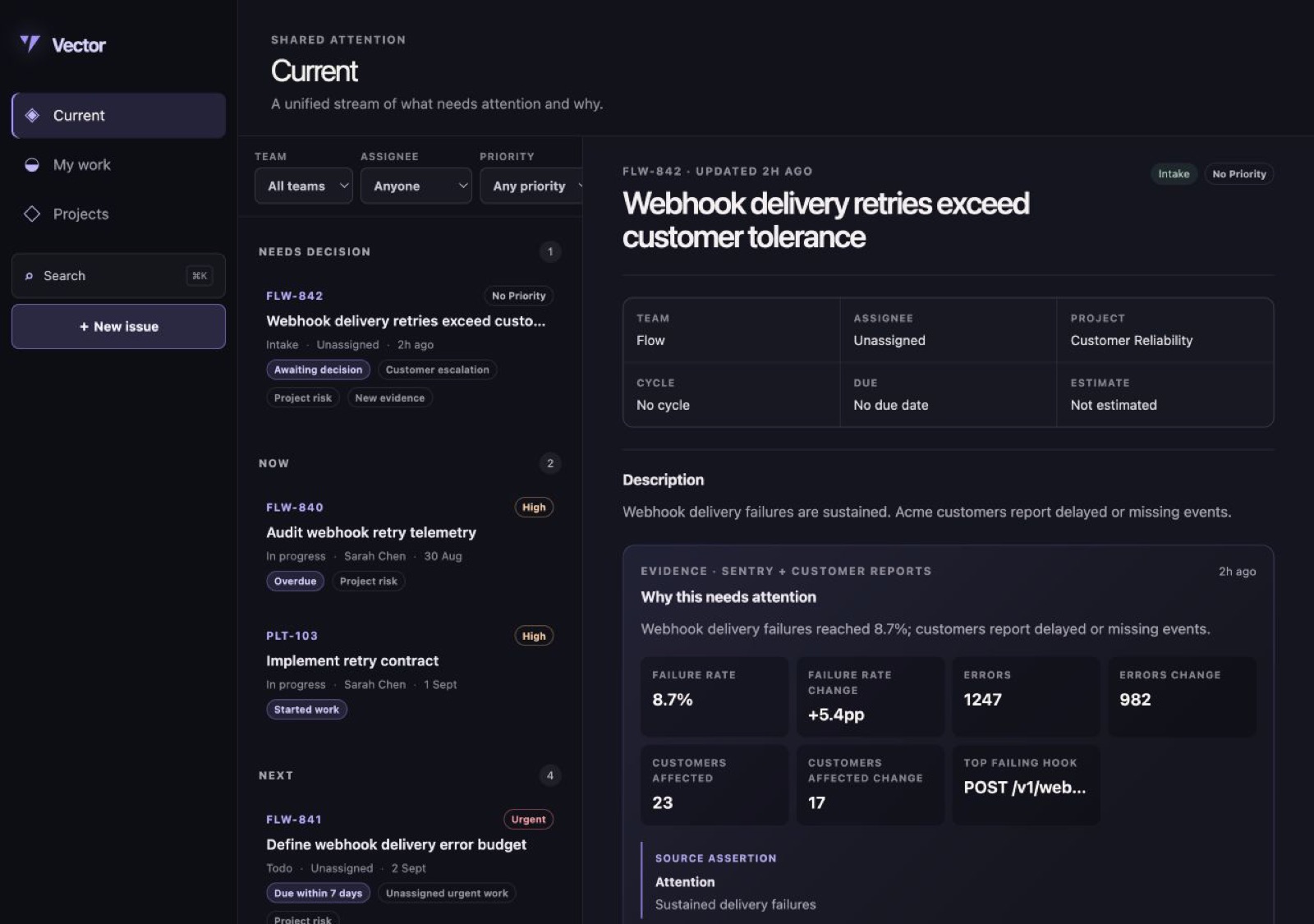
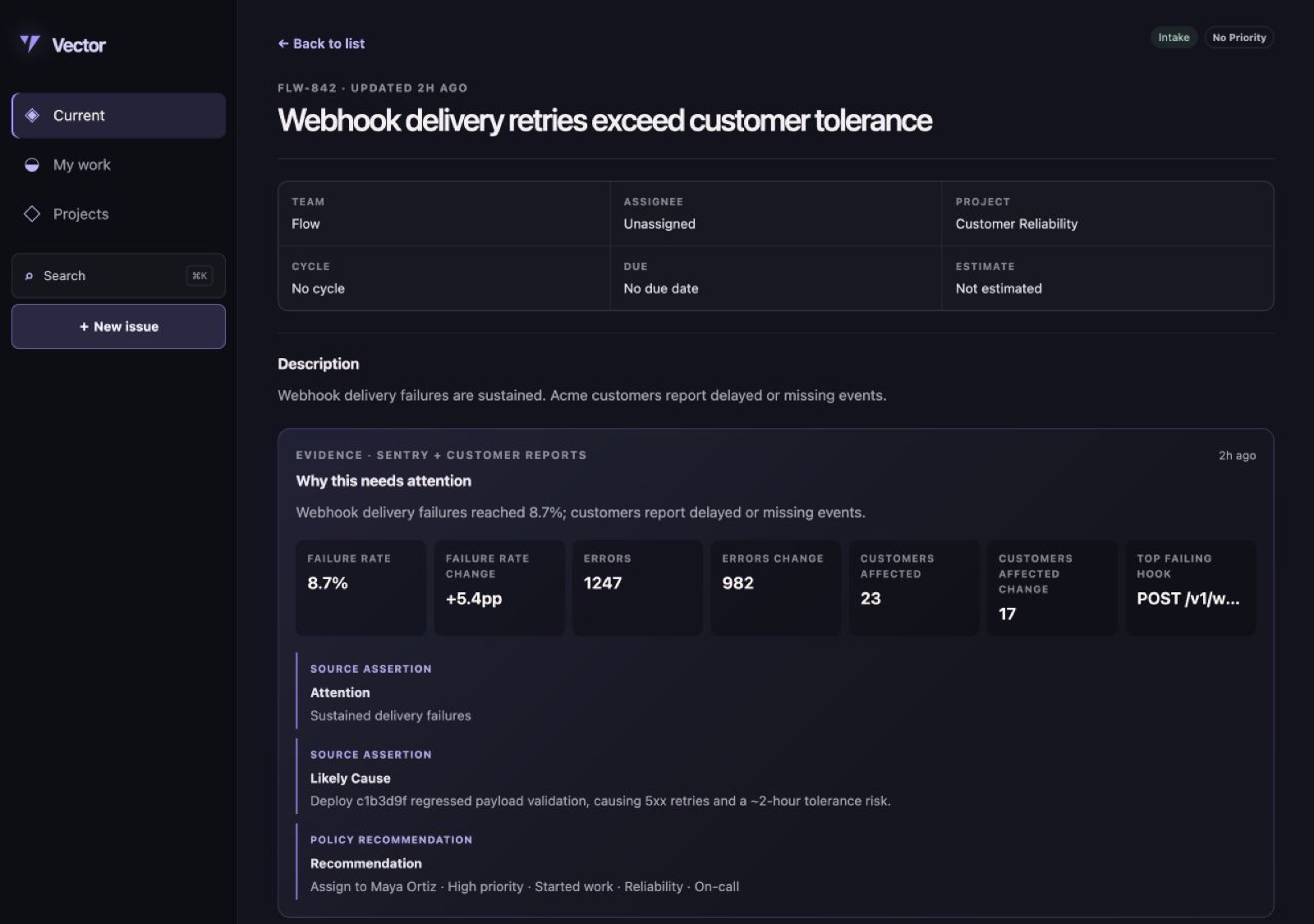
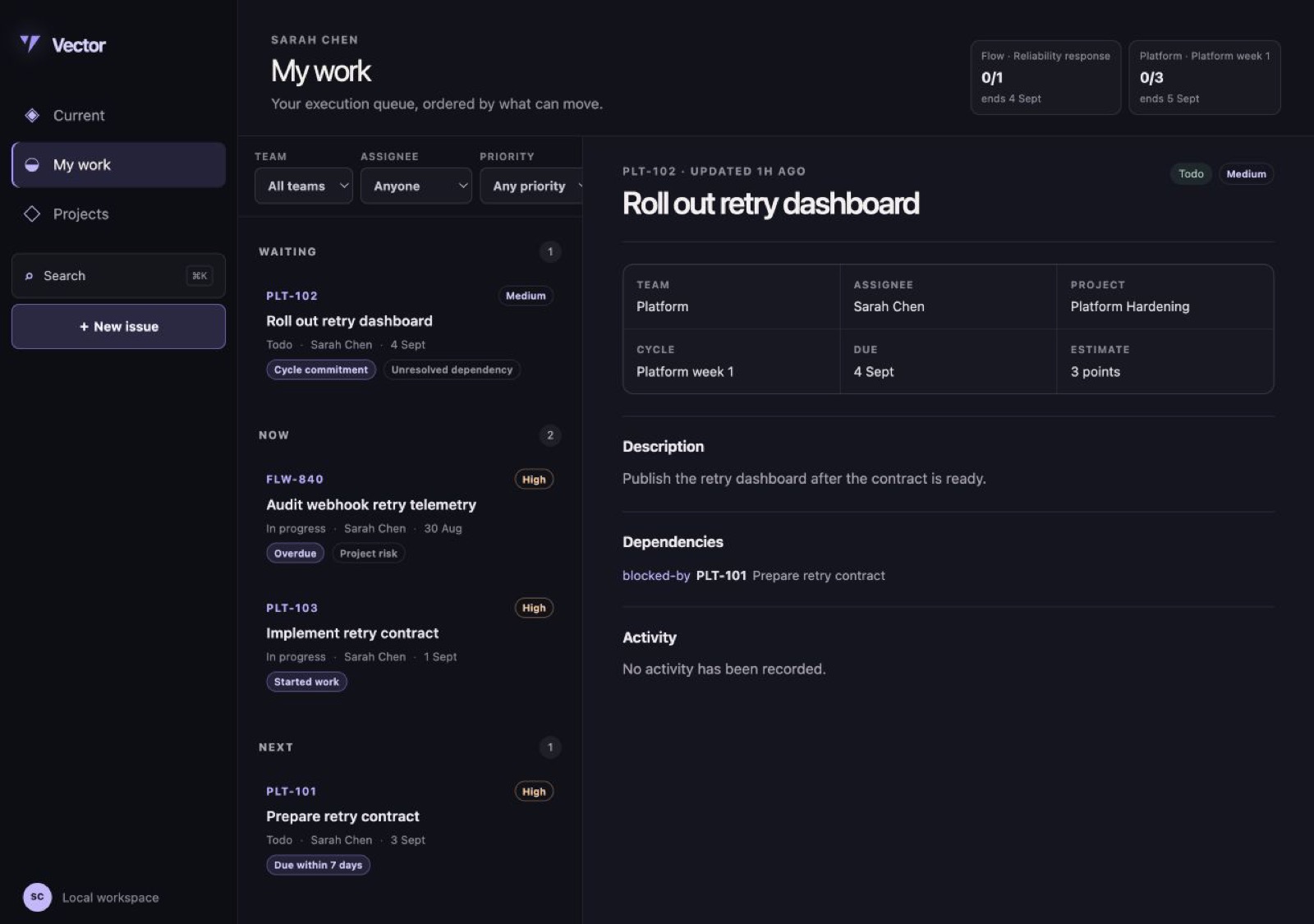
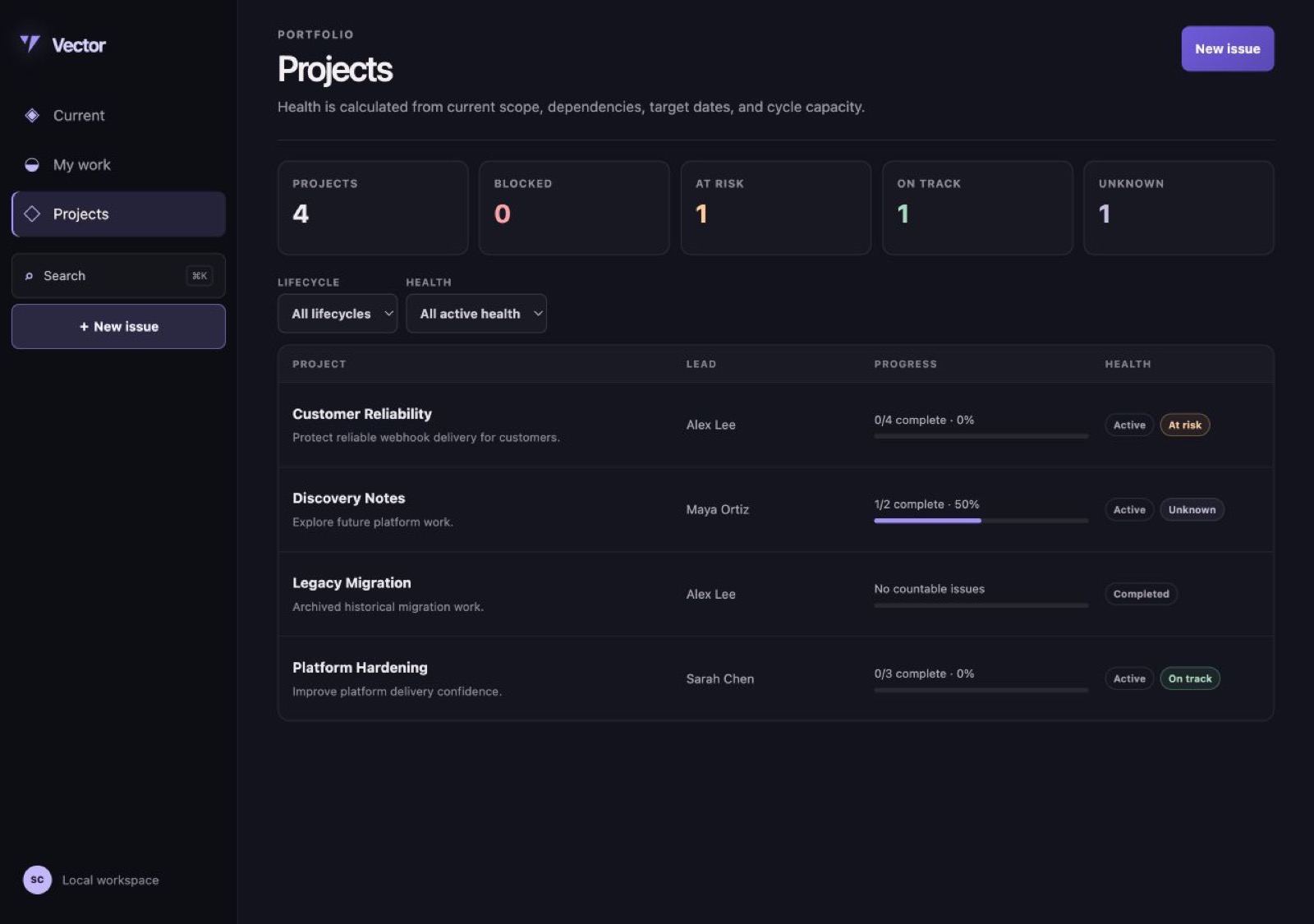
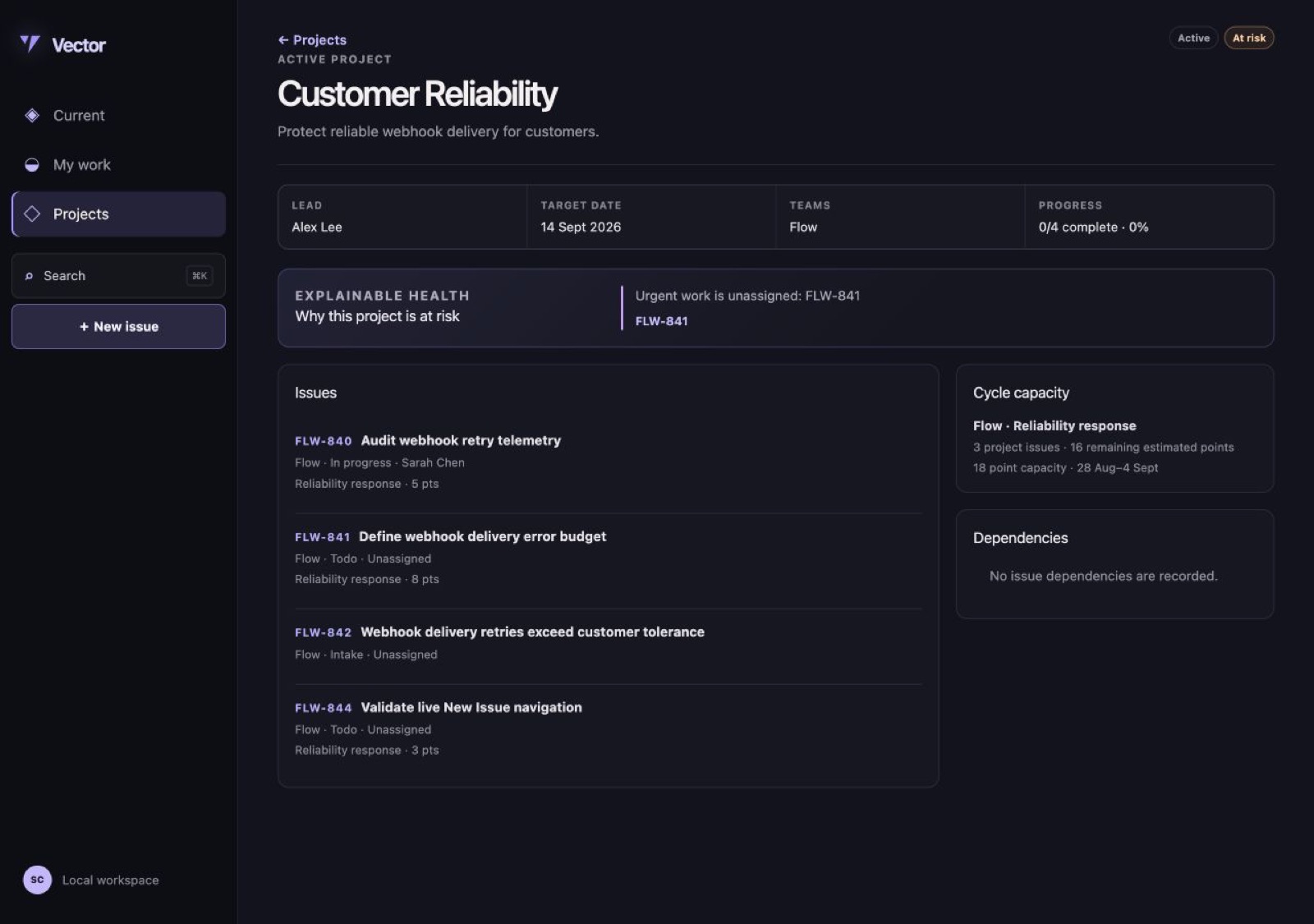
From the project’s own visual and verification records. Its handover says what was exercised.
Outside services
The services the project declares it sends data to, each with its reason.
transactional-email- BASE-ACCESS-001 requires delivery of single-use magic links; Cloudflare D1, R2, and Queues do not deliver internet email. It is the only outbound channel: NOTIFY-001 keeps every product notification in-app.
Scope and limits
What it will not do
- Multiple workspaces, tenants, or organisations
- Roles, per-team visibility, and granular permissions
- External customer accounts, portals, forms, or public roadmaps
- Source-specific Sentry, Slack, GitHub, GitLab, Jira, or email integrations in core
- AI triage, deduplication, ranking, or project-health inference
- Custom workflow categories
- Manually drag-ranked backlogs; every order in Vector is derived and explainable
- Initiatives, roadmaps, Gantt charts, critical-path planning, time tracking, or resource management
- Per-issue checklists
- Multiple assignees
- Notification delivery by email, chat, or push; notifications are in-app only
- Native mobile applications
- Real-time collaborative text editing
Extension points
Optional conveniences for common changes. Owners can change any source, including core logic, schema and infrastructure.
app.page.v1app.navigation.v1settings.section.v1api.route.v1job.consumer.v1schedule.cron.v1operator.management.v1issue.defaults.v1issue.can-delete.v1intake.recommendation.v1current.ranking.v1project.health.v1cycle.rollover.v1issue.created.v1issue.updated.v1issue.completed.v1comment.created.v1intake.received.v1intake.decided.v1project.updated.v1cycle.closed.v1notification.created.v1import.completed.v1navigation.after.v1current.header.after.v1current.item.actions.v1my-work.header.after.v1issue.header.after.v1issue.sidebar.after.v1issue.detail.tabs.v1project.row.actions.v1project.detail.tabs.v1settings.sections.after.v1mail.sender.v1signal.source.v1
Declared limits
- Status
- estimated-not-load-tested
- Operators
- 100
- Concurrent Operators
- 50
- Teams
- 50
- Issues
- 250,000
- Projects
- 2,000
- Cycles Per Team
- 500
- Comments Per Issue
- 1,000
- Evidence Revisions Per Issue
- 500
- Saved Views Per Operator
- 100
- Labels
- 500
- Labels Per Issue
- 20
- Dependency Links Per Issue
- 50
- Signal Sources
- 50
- Bulk Edit Issues Per Operation
- 250
- Import Records Per Run
- 5,000
- Attachment Bytes Per File
- 26,214,400
- Attachment Bytes Total
- 10,737,418,240
- Attachment Mime Types
- image/png, image/jpeg, image/webp, image/gif, application/pdf, text/plain, text/csv, application/json, application/zip
- Request Body Bytes
- 1,048,576
- Authenticated Requests Per Minute Per Operator
- 600
- Public Requests Per Minute Per Ip
- 120
- Magic Link Requests Per15 Minutes Per Ip
- 5
- Signal Source Requests Per Minute Per Source
- 300
- Signal Source Requests Per Minute Per Ip
- 600
Requirements
All 88 clauses of Vector’s CONTRACT.md. They say what the project must do; the handover and verification records say what is built and tested.
HOME 1 clause
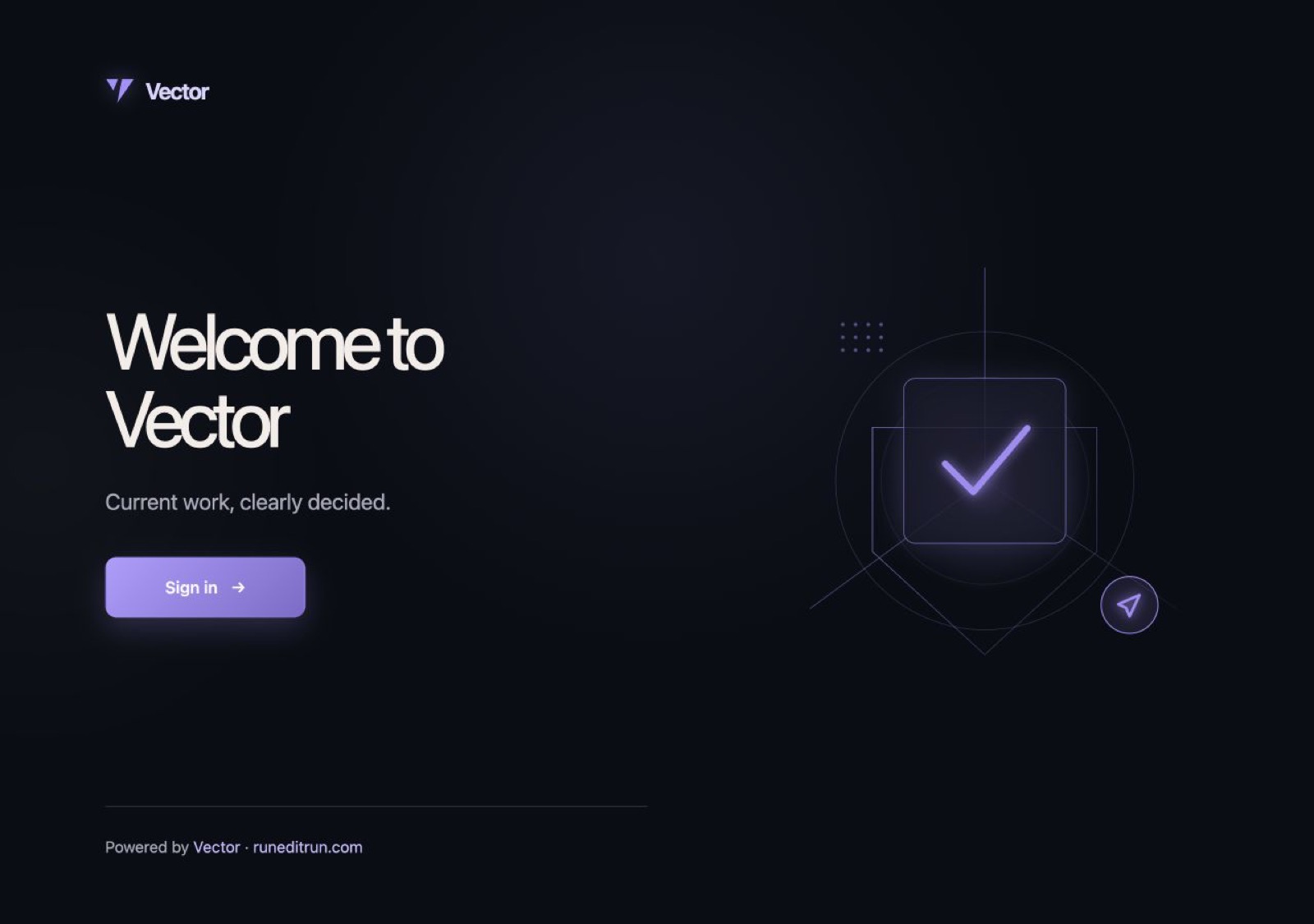
HOME-001Owner identity plate. The public landing shows the configured owner's name, one configured statement of purpose, and a sign-in link. It contains no pricing, feature tour, customer testimonials, or invented metrics. The configured “Powered by <product> · runeditrun.com” credit is shown only when enabled.
OPS 4 clauses
OPS-001Equal operators. Every operator can see and act on every team, issue, intake item, cycle, project, label, and shared saved view, and on every notification addressed to them. There are no roles. Team membership organises work and never grants or restricts access. A private saved view (VIEW-002) is the only record one operator cannot see.OPS-002Operator management. Operators are invited and removed in settings. The operator configured at setup can be removed only by themselves. Policy:operator.management.v1; default: any operator may invite or remove.OPS-003Workspace time. Settings hold one IANA workspace timezone. Every calendar day, due reminder, cycle start and end instant, and seven-day window named in this contract is evaluated in that timezone. Changing it never rewrites stored instants, closed cycle snapshots, or reminders already delivered.OPS-004Safe removal. Vector rejects removal of the last operator. A successful removal revokes that operator's sessions, unassigns their non-terminal issues, transfers each project they lead and each shared saved view they own to the operator performing the removal — or to the longest-standing remaining operator when they removed themselves — deletes their private saved views and their notifications, anonymises their references in retained comments, activity, and audit records, and writes one activity entry per changed issue and project.
TEAM 4 clauses
TEAM-001Team identity. A team has a name and an identifier prefix, each unique across archived and non-archived teams. The prefix is two to ten uppercase letters and cannot be changed once the team has an issue, so existing identifiers stay resolvable. Every issue belongs to exactly one team.TEAM-002Team workflow. Every team has an ordered list of workflow statuses with at least one status in each of the Intake, Backlog, Unstarted, Started, Completed, Canceled, and Duplicate categories, and status names unique within the team. Operators can add, rename, and reorder statuses; a status never changes category, and no category is added or removed. A team's default status in a category is the first status of that category in workflow order, and every clause naming a category as a destination moves the issue there.TEAM-003Team archiving. Archiving a team stops new issues, intake, and issue moves from targeting it while preserving its issues, cycles, projects, identifiers, and history; a signal source request naming an archived team creates nothing and returns 409. Unarchiving restores normal use. Teams are never deleted; archiving is the only terminal state.TEAM-004Status removal. Removing a workflow status requires a destination status in the same category and atomically moves every issue to it. Vector rejects removal of a category's last status and records the status mapping in audit history.
ISSUE 15 clauses
ISSUE-001Creation. An operator can create an issue with a required title and team plus an optional Markdown description, assignee, project, cycle, priority, labels, estimate, due date, expected outcome, customer impact, and custom fields. It starts in the team's default Backlog status unless another non-Intake status is explicitly chosen. Policy:issue.defaults.v1; default: unassigned, no priority, no cycle, and no project.ISSUE-002Stable identifiers. An issue identifier is its team's prefix, a hyphen, and an integer one higher than the highest ever allocated under that prefix, so a number is never reused after an issue is deleted. The identifier never changes, including when the issue moves teams (ISSUE-012); a prefix therefore records where an issue started, not where it lives.ISSUE-003Priority. An issue has exactly one priority: Urgent, High, Medium, Low, or No priority. No priority is the default and sorts after Low.ISSUE-004Status transitions. A version-checked operator mutation (ISSUE-006) can move an issue in any direction among the Backlog, Unstarted, Started, Completed, and Canceled statuses of its team's workflow. Vector rejects moving any issue into an Intake status. Leaving Intake uses INTAKE-005, INTAKE-007, or REL-003; entering or leaving Duplicate uses REL-003 or REL-005. Entering Completed records the completion time and entering Canceled records the cancellation time; leaving one of those categories clears the time it recorded and removes no activity.ISSUE-005Assignment. An issue has at most one assignee. Assigning, reassigning, or unassigning it takes effect immediately and records the actor, the previous assignee, and the new assignee.ISSUE-006Concurrent edits. Every issue carries an integer version that increases by one on each mutation that appends an activity entry under ISSUE-007. An issue mutation carries the version the client last read; if the stored version is higher, Vector rejects the mutation with 409 and returns the current issue and version, changing nothing. Adding a comment, evidence revision, follower, or notification does not change the version and is never rejected as stale.ISSUE-007Activity history. Creation and every change to title, description, team, status, priority, assignee, project, cycle, estimate, due date, labels, expected outcome, customer impact, custom fields, duplicate target, parent, or dependency append an immutable activity entry recording the time, the previous value, the new value, and the actor — the operator, or the named automation when a cycle closure, deferral return, or import acted.ISSUE-008Comments. Any operator can add a Markdown comment, and can edit or delete any comment; the entry records who acted. An edited comment shows its edit time. Deleting a comment removes its body, attachments, links, and search entry, leaves a tombstone and an activity entry in the thread, and does not remove the follower state it created.ISSUE-009Attachments and links. Operators can attach files and named HTTPS links to an issue or a comment. Removing either records the action; removing a file also deletes its blob underBASE-DATA-003.ISSUE-010Deletion. Deleting an issue removes its comments, attachments, links, evidence revisions, dependencies, parent link, follower state, notifications, activity, and search entry; its children become root issues, and a duplicate is removed from its canonical issue's list. Vector rejects deleting a canonical issue that still has duplicates. Closed cycle snapshots (CYCLE-005) and audit entries keep only its identifier, and its source idempotency records (INTAKE-002) are retained so a re-delivery cannot resurrect it. Policy:issue.can-delete.v1; default: any operator.ISSUE-011Estimates. An issue estimate is absent or an integer from 1 through 100 points. Changing an estimate never rewrites a closed cycle snapshot.ISSUE-012Moving teams. Moving an issue requires a non-archived target team and an explicit target status in the same category as its current status, including Intake so a misrouted intake item reaches the right team without a decision. The move preserves the identifier (ISSUE-002), uncommits the issue from any cycle (CYCLE-002), keeps its project, assignee, labels, and history, and writes one activity entry. All of it happens or none of it does.ISSUE-013Mentions. Typing@in an issue description or comment offers matching operators, and choosing one records a mention of that operator. Text resolving to no operator is stored and shown literally and mentions nobody. A mention adds a follower (NOTIFY-002) and notifies once (NOTIFY-001); editing text to add a mention notifies only the newly mentioned operator, and removing a mention notifies nobody and withdraws no delivered notification.ISSUE-014Labels. A label belongs to the workspace and has a name unique among labels and a colour. Any operator can create, rename, recolour, and delete one; deleting a label removes it from every issue and from the filters of saved views naming it, and deletes no issue. An issue carries up to the number of labels inseed.json → limits.ISSUE-015Unsent drafts. An unsubmitted new-issue form is retained in the operator's browser and restored the next time they open new issue there. A draft is not a record: it appears in no list, search result, notification, or export, and becomes an issue only when that operator creates it.
REL 6 clauses
REL-001Dependencies. An operator can record that one issue blocks another, across teams, and can remove the link. Vector rejects self-links, a link that already exists in either direction, and any link that would create a directed cycle.REL-002Blocked state. An issue is shown as blocked while any issue that blocks it is outside a Completed, Canceled, or Duplicate category. Blocking never changes the issue's workflow status by itself.REL-003Duplicate decision. Marking an issue as a duplicate requires one canonical issue that is neither itself nor already a duplicate, moves it to the team's default Duplicate status, and preserves its description, comments, evidence, attachments, and activity under the duplicate issue.REL-004Canonical duplicates. A canonical issue lists every direct duplicate. If it is later marked duplicate, Vector atomically repoints its duplicates to the new canonical issue, so a duplicate chain or cycle is never exposed.REL-005Undo duplicate. Undoing a duplicate decision removes the canonical link and restores the issue's most recent non-terminal status, or its team's default Backlog status if it has none, while preserving both decision activity entries.REL-006Parent and child. An issue has at most one parent. Vector rejects self-parenting and ancestry cycles; changing a parent never changes status, team, project, cycle, or assignee, and deleting a parent makes each direct child a root issue.
INTAKE 11 clauses
INTAKE-001Intake creation. A registered signal source (INTAKE-011) creates an intake issue with a title, team, observed time, its source ID, source display name, source record identifier, source revision identifier, summary, link, and optional structured measurements and customer reports. An operator creates one with a title and team and any of the same descriptive fields, attributed to that operator instead of a source. Either way it starts in the team's default Intake status and appears in Needs decision (CURR-002) within 5 seconds.INTAKE-002Idempotent sources. Re-delivery of the same source ID, source record identifier, source revision identifier, and normalised payload returns the original result and creates nothing. Re-delivery of an identity whose issue has since been deleted (ISSUE-010) returns 410 and creates nothing. Reusing an identity with a different payload returns 409 and changes nothing.INTAKE-003Evidence revisions. A new source revision identifier for an existing source record appends immutable dated evidence even when revisions arrive out of order. The issue orders evidence by observed time, then receipt time, and shows a field-level change from the preceding observed revision.INTAKE-004Inspectable assessment. An intake issue shows the evidence behind its attention reason, impact measurements, likely cause, recommended assignee, and suggested priority. Each assertion names whether it came from a source, an operator, or a policy; Vector does not invent or silently infer assertions in core.INTAKE-005Accept. Accepting an intake issue atomically records the actor, the time, and an optional reason; applies the chosen assignee, priority, cycle, and Started or Unstarted status; and clears any deferral. It leaves Needs decision and reaches its new Current and My work sections within the CURR-008 window.INTAKE-006Defer. Deferring an intake issue records the operator, an absolute return time strictly in the future, and an optional reason, and removes it from Needs decision. It returns there exactly once — within 5 minutes of the return time, or within 5 seconds of a new evidence revision (INTAKE-003), whichever comes first — and the return atomically clears the deferral and leaves the earlier decision visible. An operator can defer it again or end a deferral early.INTAKE-007Decline. Declining an intake issue requires a reason, moves it to the team's default Canceled status, and removes it from Needs decision without deleting its evidence or decision history.INTAKE-008Evidence after a terminal decision. Evidence received after an issue is Canceled or Duplicate is appended and visible but never reopens, reassigns, reprioritises, or resurfaces the issue.INTAKE-009Source failure. A signal source request from an unknown or revoked source, or carrying a wrong signature, returns 401; one whose body fails validation returns 400; one naming an archived team returns 409 (TEAM-003). None of them creates anything. A valid request that cannot be stored durably returns 503 so the source retries. No request is acknowledged before its idempotency record and evidence are durable.INTAKE-010Decision policy. Suggested assignee, priority, and start state are selected by the intake recommendation policy and are always editable before acceptance. Policy:intake.recommendation.v1; default: use an explicitly supplied team and assignee, otherwise leave the issue unassigned with No priority and Unstarted status.INTAKE-011Source registration. An operator registers a signal source with a display name, a source ID unique in the workspace, and a signing secret; thesignal.source.v1adapter normalises that source's signed request into INTAKE-001. Rotating a secret accepts both secrets for a configurable overlap of at most 24 hours and then rejects the previous one. Revoking a source rejects every later request under INTAKE-009 and deletes no evidence. A secret is shown once at registration or rotation and never again.
CURR 9 clauses
CURR-001Disjoint stream. Current places an issue in at most one section using this precedence: Needs decision, Now, Next, then Recently done. Canceled, Duplicate, deleted, and actively deferred issues do not appear.CURR-002Needs decision. Needs decision contains every Intake-category issue whose deferral has expired or is absent and which has not been accepted, declined, or marked duplicate.CURR-003Now. Now contains non-terminal issues outside the Intake category that are overdue or in a Started status, excluding anything already in Needs decision. An issue is overdue when its due date is earlier than the current calendar day in the workspace timezone (OPS-003).CURR-004Next. Next contains non-terminal issues in an Unstarted status that are committed to their team's active or next cycle (CYCLE-001) or due within the next seven calendar days, excluding anything already in a higher-precedence section.CURR-005Recently done. Recently done contains issues moved to a Completed category in the previous seven calendar days, newest completion first.CURR-006Explainable attention. Every issue in Current shows one primary inclusion reason — Awaiting decision, Started work, Overdue, Cycle commitment, Due within seven days, or Completed within seven days — and every applicable context reason from Customer escalation, Unresolved dependency, Unassigned urgent work, Project risk, and New evidence since the most recent intake decision.CURR-007Ranking. Within a section the default order sorts by priority (Urgent first, No priority last), then by due date (overdue first, then earliest first, then issues with no due date), then by most recent update, and finally by stable identifier, so the order is total and stable. Policy:current.ranking.v1.CURR-008Freshness. A decision or issue mutation that changes an issue's Current membership, section, or reasons is reflected in an already open Current view within 5 seconds without an operator-initiated reload, and in the next response to any other request.CURR-009Stream controls. Operators can filter Current by team, project, priority, item type, assignee, and attention reason. The default includes all teams and all operators and shows Recently done.
WORK 3 clauses
WORK-001Personal queue. My work contains every non-terminal issue assigned to the signed-in operator outside the Intake category, grouped disjointly in this precedence: Waiting for issues blocked under REL-002, Now for those the CURR-003 rule would place in Now, and Next for every issue still remaining, each group ordered by CURR-007. An issue assigned to the operator while in an Intake status appears in Current's Needs decision, not here.WORK-002Personal defaults. Completed, Canceled, Duplicate, and actively deferred issues never appear in My work; an operator reads their finished work from Current's Recently done filtered to themselves (CURR-005, CURR-009). When no issue qualifies, the view states the operator is caught up and offers new issue and Current as next actions.WORK-003Cycle context. My work shows one row for each team that has an active cycle containing an issue assigned to the operator, giving that cycle's name, start and end dates, and progress, with completed and total committed scope labelled in the unit CYCLE-003 used.
PROJ 9 clauses
PROJ-001Project record. A project has a name unique in the workspace, a Markdown description, exactly one lead who is an operator, an optional target date, a lifecycle, an optional colour, an optional icon, and custom fields. Its lifecycle is Planned, Active, Completed, or Canceled, and it starts as Planned.PROJ-002Manual lifecycle. Only an operator changes a project's lifecycle. Completing or canceling all of its issues never completes or cancels the project.PROJ-003Project membership. An issue belongs to at most one project. Removing an issue from a project or archiving a project never deletes the issue; deleting a project detaches all of its issues but deletes none of them.PROJ-004Progress. Project progress counts issues: completed project issues divided by all project issues outside the Canceled and Duplicate categories. The interface shows the completed and total counts beside the percentage and reports no progress when the denominator is zero.PROJ-005Health. Health is reported only for projects in the Active lifecycle; every other lifecycle reports no health and is excluded from health filters and counts. A remaining issue is a project issue outside the Completed, Canceled, and Duplicate categories. An Active project is Blocked, At risk, On track, or Unknown, evaluated in that order. The default reports Blocked when at least one remaining issue exists and either an Urgent remaining issue has an unresolved blocker (REL-002) or every remaining issue is blocked; At risk when its target date is in the past, a remaining Urgent issue is unassigned, or its remaining estimated points committed to any team's active cycle exceed that cycle's capacity; On track when a target date in the future, every applicable capacity, and every remaining active-cycle estimate exist and no earlier rule matches; and Unknown otherwise. Remaining scope exactly equal to capacity is not At risk. Policy:project.health.v1.PROJ-006Risk explanation. Every Blocked or At risk project shows the exact issues and measurements that triggered its health, including unresolved dependencies, unowned urgent work, target-date exposure, and committed scope against capacity.PROJ-007Portfolio. The Projects view shows the count of projects in each health and lifecycle state and can filter by lifecycle, health, lead, team, target date, and label. Counts and rows use the same active filters.PROJ-008Historical truth. Later issue edits update live project progress and health but never rewrite a closed cycle snapshot shown in that project's history.PROJ-009Project archiving. Archiving a project removes it from the default portfolio and stops new issues from joining it while preserving its lifecycle, issues, history, and closed-cycle snapshots. Operators can include archived projects in filters or unarchive one.
CYCLE 6 clauses
CYCLE-001Time box. A cycle belongs to one team and has a name unique within that team, a start instant, an end instant after the start, and an optional capacity in estimate points, all interpreted in the workspace timezone (OPS-003). Vector rejects a cycle whose dates overlap another cycle of the same team, so a team's active cycle — the one whose start is at or before now and whose end is after now — is unique, and its next cycle is the cycle of that team with the earliest start at or after the active cycle's end.CYCLE-002Commitment. A non-terminal issue can be committed to at most one cycle, and only to a cycle of its own team. Committing, moving, and uncommitting record both cycle identifiers and update both cycles atomically.CYCLE-003Progress and capacity. Cycle progress is completed committed estimate points divided by all non-Canceled, non-Duplicate committed estimate points when every included issue is estimated; otherwise it uses issue counts and labels the resultby issue count. With no included issues it showsNo committed workand no percentage. Capacity risk is Unknown unless capacity and every remaining estimate exist, At risk when remaining points exceed capacity, and Within capacity otherwise.CYCLE-004Closure and rollover. Within 5 minutes of a cycle's end instant Vector closes it exactly once however many times the closing job runs, and by default moves committed issues in an Unstarted or Started status to the team's next cycle (CYCLE-001) and uncommits committed issues in an Intake, Backlog, Completed, Canceled, or Duplicate status. A closed cycle's name, dates, capacity, and snapshot cannot be changed, and a closed cycle is never reopened. Policy:cycle.rollover.v1.CYCLE-005Closure snapshot. Closing a cycle records committed and completed issue IDs, each issue's project ID at close, estimate totals, capacity, progress, additions and removals during the cycle, and the close time. The snapshot is immutable.CYCLE-006Missing next cycle. If rollover is required and no next cycle exists, the cycle still closes, its unfinished issues become uncommitted, and one visible failed-operation entry names the affected issues; creating a later cycle does not move them.
SEARCH 3 clauses
SEARCH-001Global search. Search covers issue identifiers, titles, descriptions, expected outcomes, customer impact, comments, evidence summaries, project names, and label names, and returns within 500ms. Issues of archived teams and projects are excluded unless the operator asks for them.SEARCH-002Exact identifier. An exact issue identifier lookup reads the primary record and returns it even while full-text indexing is delayed or failed.SEARCH-003Index freshness. Created or changed searchable text appears in full-text results within 10 seconds. A failed indexing job is visible to operators with its last successful index time; Vector never presents known-stale results as complete.
VIEW 4 clauses
VIEW-001Issue controls. Issue lists can filter by status, status category, priority, assignee, team, project, cycle, label, due date, and blocked state; sort by newest, oldest, Urgent-to-No-priority, workflow status order, due date, or last update; and group by none, status, assignee, priority, project, cycle, or team. Completed issues are hidden by default outside Current.VIEW-002Saved views. An operator can save a named combination of filters, sort, and grouping as private or shared, then update, duplicate, or delete it. A private view is visible and editable only by its owner; any operator can open or duplicate a shared view, but only its owner can update or delete it, and ownership changes only under OPS-004. Deleting a view never changes an issue.VIEW-003Control persistence. The filters, sort, and grouping an operator last applied to Current, My work, the Projects portfolio, and each issue list are stored for that operator and restored on their next visit from any browser, and one visible control resets them to the defaults. Opening a saved view never changes the stored controls of the list it was opened from.VIEW-004Bulk edit. An operator can select several issues in a list and set status, assignee, priority, project, cycle, or labels on all of them in one operation, up to the batch limit inseed.json → limits. The operation is atomic: if any selected issue fails ISSUE-004, ISSUE-006, or CYCLE-002, nothing is written and the response names the failing issues by identifier. A successful operation writes one activity entry per issue.
CMD 3 clauses
CMD-001Command palette. The command palette searches issues, projects, saved views, and available commands from one input. The up and down arrows move the highlight, Enter opens the highlighted record or performs the highlighted command, and Escape closes the palette without acting.CMD-002Keyboard navigation. Outside editable controls, Command/Ctrl-K opens the palette, C opens new issue, G then M opens My work, G then C opens Current, G then P opens Projects, and Escape closes the topmost transient surface. Every command also has a visible, keyboard-operable control.CMD-003Focus and selection. The up and down arrows move a visible focus indicator through the rows of the active list, Enter opens the focused row, X adds or removes it from the selection VIEW-004 acts on, and Escape returns focus from an open detail pane to the row it was opened from. Changing a filter, sort, or grouping keeps the focused row focused while it remains in the list and focuses the first row when it does not.
NOTIFY 5 clauses
NOTIFY-001Inbox events. Vector creates an in-app notification, visible within 5 seconds, for assignment of an issue to the operator, a direct mention (ISSUE-013), a comment on an issue they follow, the return of an intake item they deferred, the resolution of the last blocker on an issue assigned to them, and a due reminder (NOTIFY-005). Vector delivers notifications on no other channel; the only mail it sends is the sign-in linkBASE-ACCESS-001requires.NOTIFY-002Followers. Issue creators, assignees, commenters, and directly mentioned operators follow the issue automatically; an operator can follow or unfollow it explicitly without changing anyone else's following.NOTIFY-003No self-notification. An action never notifies its actor. One event creates at most one notification per recipient and issue even when the recipient qualifies through several follower rules.NOTIFY-004Read and mute. Opening a notification marks it read, an operator can mark all of theirs read in one action, and the interface shows their unread count. An operator can mute an issue or an event type, which suppresses only their own later matching notifications and alters neither activity history nor another operator's notifications.NOTIFY-005Due reminders. Within 5 minutes of the configured daily reminder time — 09:00 in the workspace timezone by default — Vector notifies the assignee once for each incomplete issue assigned to them that is due that day, and once more on the first run after it becomes overdue. Changing a due date makes the new date eligible and never repeats a reminder already delivered for the same issue and date.
DATA 5 clauses
DATA-001Export contents. The portable export contains a manifest, original attachment bytes, and every operator, team, workflow status, issue, comment, attachment metadata, link, relation, evidence revision, intake decision, project, cycle and snapshot, label, saved view, notification, custom field, non-secret setting, idempotency record, failed operation, and audit entry. It never contains a session, signing, source, or provider secret.DATA-002Mapped import preflight. Separately from portable restore, an operator can preflight an import of issues supplied as CSV rows or as a JSON array of objects with the same field names, before anything is written. The fields are title, description, team, status, priority, assignee, project, cycle, labels, estimate, due date, expected outcome, customer impact, source ID, and source record ID. The preflight validates the mapping, the timestamps, and every team, status, assignee, project, cycle, label, duplicate, and dependency reference, and reports every row that would fail with its row number and reason.DATA-003Atomic mapped import. Applying a successful preflight writes the batch atomically, preserves supplied creation and update times, and records an import-run identifier. A failed apply writes none of the batch.DATA-004Idempotent mapped import. Reapplying the same import-run identifier and source record identifiers creates no duplicates and returns the first run's result. A mapped import creates normal activity and one audit entry for the run, and no operator notifications.DATA-005Exact portable restore.pnpm importrestores a portable DATA-001 archive without synthesising activity, audit entries, notifications, or new timestamps; its records are equivalent after export, import, and export asBASE-DATA-001requires.
Baseline
Selected ownership clauses from the 22 in the project’s BASELINE.md. They are declared requirements; evidence is recorded separately.
BASE-DATA-005Independence. The deployment makes no request to the marketplace or the seed author. There is no telemetry, phone-home, licence check, or kill switch.BASE-DATA-001Export and import.pnpm exportproduces every record and attachment;pnpm importrestores it into an empty deployment; export, import, export yields an archive with equivalent contents.BASE-DATA-004Outbound flows. User data leaves the deployment only through externals declared inseed.json → externals. No other outbound request carries user data.BASE-PUBLIC-001Privacy. Public surfaces (widgets, booking pages, forms, status pages) set no cookies, load nothing from third-party domains, and send no visitor data before the visitor's first interaction.BASE-SECRET-001No leakage. No secret appears in the client bundle, in logs, or in an error response.
View as agent
Everything on this page is in these files, copied unmodified from the release. An agent evaluating Vector can read them instead of the page.
AGENTS.md- Instructions for the coding agent that maintains an installation.
BASELINE.md- The baseline requirements the project declares.
CONTRACT.md- The requirements on this page, in source form.
HANDOVER.md- Maintainer orientation and verification status.
seed.json- The manifest: capabilities, outside services, extension points, limits, operating cost and deployment needs.
Every project, with its availability, is in /agents/catalogue.json; the agents page describes the machine-readable files.